第七章预告:字符串、文本、各种打印、转义序列、手动输入raw_input()
------------------------------------<习题6:字符串和文本>---------------------------------------
在这里还时有必要详细介绍一下字符串以及和格式化字符之间的应用:
字符串:通常是指需要展示给别人的或者是想要从程序里“导出”的一小段字符,吧啦吧啦吧啦吧啦,是不是觉得挺拗口的,不如举个例子来的实在。
在ex1.py的这段代码print "hello world!"中,双引号括住的 hello world! 就是字符串。
格式化字符串的各种应用:参考ex6.py


                 1
                #
                 -*-coding:utf-8-*-
                 2
                 3
                #
                 第一种:直接用%d
                 4 x = ‘There are %d types of people‘ % 10
 5 6#第二种:用%s来将变量转换成字符串 7 8# 定义binary 9 binary = ‘binary‘10# 定义do_not11 do_not = "don‘t"12# 定义y的意思(把变量转换成字符串)13 y = ‘Those who know %s and those who %s.‘ % (binary, do_not)
1415# 输出x16print x
17# 输出y18print y
1920#第三种:用%s和%r来将变量转换成字符串,该变量也适用%s和%r来定义的21# 输出 我说过了x (把变量转换成字符串)22print‘I said: %r.‘ % x
23# 输出 我说过了y (把变量转换成字符串)24print"I also said: ‘%s‘." % y
2526# 定义hilarious27 hilarious = False
28# 用含有格式转换符的字符串定义joke_evaluation29 joke_evaluation = "Isn‘t that joke so funny?! %r"3031# 输出一个含有转换符的变量32print joke_evaluation % hilarious
3334# 定义W和e35 w = ‘This is the left side of ...‘36 e = ‘a string with a right side.‘3738# 输出 w+e39print w+e
终端运行结果如下:

求助!求助!求助!求助!:%r用来做调试比较好,因为它会显示变量的原始数据(raw data),而%s和其它的转换符号则是用来向用户显示输出的!谁读完这句话后能够不迷糊????
来个实例解释一下,我还没有完全理解。大概意思是%r会尽可能的展示变量原始的模样(函数、公式、字符串等等),而%s会将变量的最终结果展示出来,例如变量是一个调取日期的函数,%s直接可以输出结果,而%r会将函数也输出出来。
见ex6_1.py代码:<借鉴博客园用户stellafan>
                 1
                #
                -*-coding:utf-8-*-
                 2
                 3
                #
                 %r和%s的区别
                 4
                 5
                #
                 有些情况下,两者处理的结果是一样的,比如处理int型对象
                 6
                print
                "
                1, I am %d years old
                " % 22
 7print"2, I am %s years old" % 22
 8print"3, I am %r years old" % 22
 9print"-"*20
101112# 不同情况之一13 text = "I am %d years old." % 22
14print"4, I said: %s." % text
15print"5, I said: %r." % text # %r打印输出时能够重现它代表的对象,这里输出结果给字符串加上单引号16print"-"*20
1718#不同情况之二19import datetime
20 d = datetime.date.today()
21print"%s" % d
22print"%r" % d
23print"-"*20
终端运行结果如下:

------------------------------------<习题7&8&9:更多打印>---------------------------------------
这两个习题只是展示了打印的几种其它方式,我只贴上代码,大家可自行研究:
                 1
                print
                "
                Mary had a little lamb.
                "
                 2
                print
                "
                Its fleece was white as %s.
                " % ‘snow‘ 3print"And everywhere that Mary went." 4print"." * 10 # print 10 points 5 6 end1 = "c" 7 end2 = "h" 8 end3 = "e" 9 end4 = "e"10 end5 = "s"11 end6 = "e"12 end7 = "B"13 end8 = "u"14 end9 = "r"15 end10 = "g"16 end11 = "e"17 end12 = "r"1819# watch that comma at the end. try removing it to see what happens20print end1 + end2 + end3 + end4 + end5 + end6,
21print end7 + end8 + end9 + end10 + end11 + end12
                 1
                #
                 -*-coding:utf-8-*-
                 2 formatter = "%r %r %r %r"# 用"%r %r %r %r"试试,字符串中的格式转换符之间不需要逗号 3 4print formatter % (1, 2, 3, 4) #1,2,3,4 不需要用引号 5print formatter % ("one", "two", "three", "four") # 必须用引号 6print formatter % (True, False, False, True) #27习题中会介绍True和False的功能,不能用引号,因为引号使其变成字符串,而不是特殊意义的关键字 7print formatter % (formatter, formatter, formatter, formatter)
 8print formatter %(
 9"I had this thing.",
10"That you could type up right.",
11"But it didn‘t sing.",
12"So I said goodnight."13 )
终端运行结果如下:

------------------------------------<习题10:转义序列>---------------------------------------
这个习题中,总共列举了15个转义序列,但是总共就涉及到不到八个。下面是我在Evernote做的笔记: 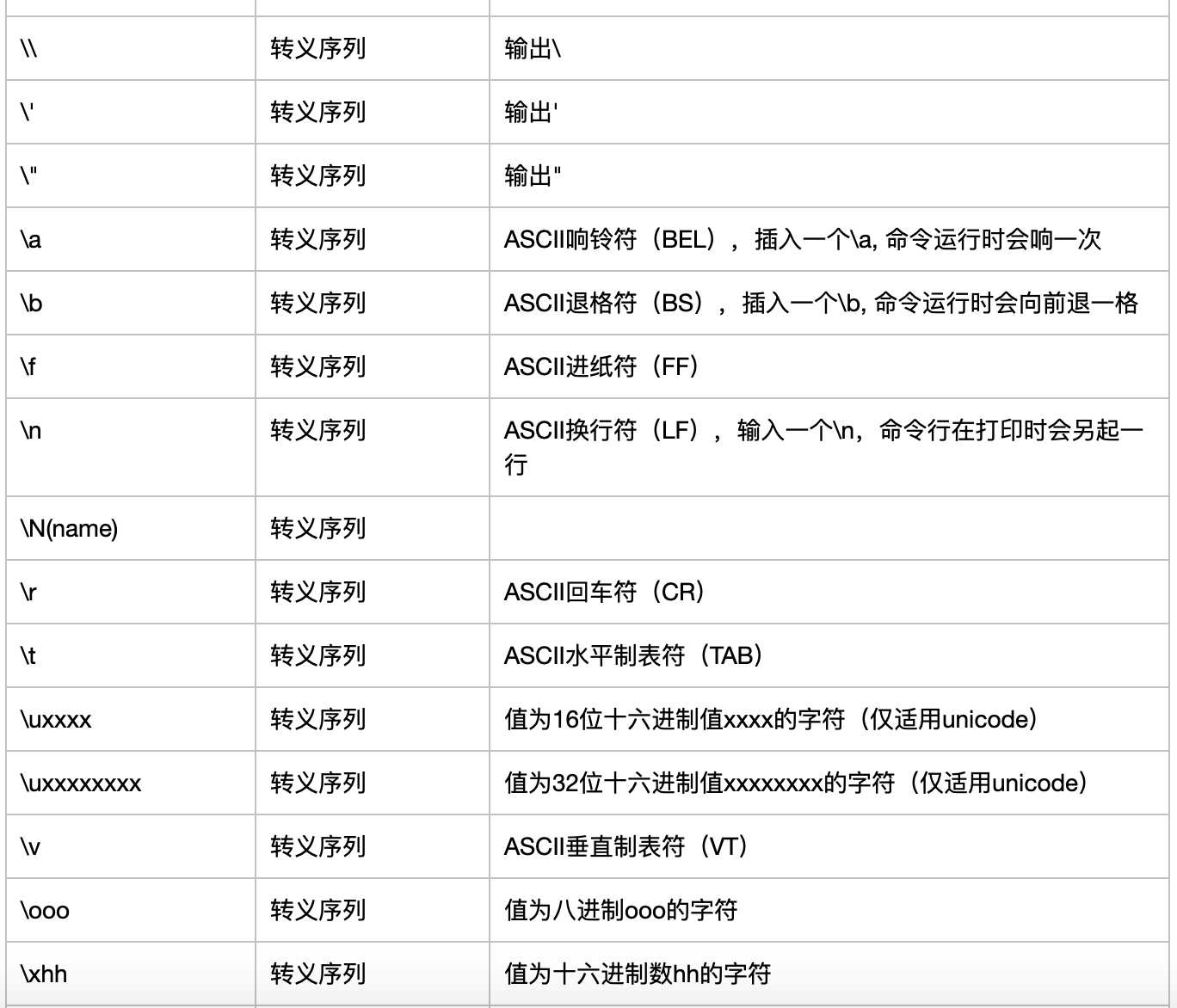
有些人可能会问,对于换行符,响铃符等有具体功能的转义符号,还能理解,但是为什么会有 \, ", ‘呢? 其实我也不是特别理解,但是我遇到过一个情况,就是需要输入多个单引号时,python会误以为是字符串的标示符号。所以为了让python知道我仅仅是想输出一个单引号,就用‘即可。
还有,a真的会响的,代码里有一个会响一次,有两个就会响两次!参考ex10.py代码。
ex10.py代码如下:
                 1
                #
                 -*-coding:utf-8-*-
                 2 tabby_cat = "tI‘m tabbed in." 3 persian_cat = "I‘m split/non a line." 4 backslash_cat = "I‘m \ a \ cat ." 5 6 fat_cat = """ 7 bI‘ll do a list:
 8t* Cat food a
 9t* Fishies a a a
10t* Catnipnt* Grass aooo
11"""12# v垂直制表符,t水平制表符13# a是响铃符,运行时会发出响铃的声音14# b是退格符,运行时命令行会向前退一格1516print tabby_cat
17print persian_cat
18print backslash_cat
19print fat_cat
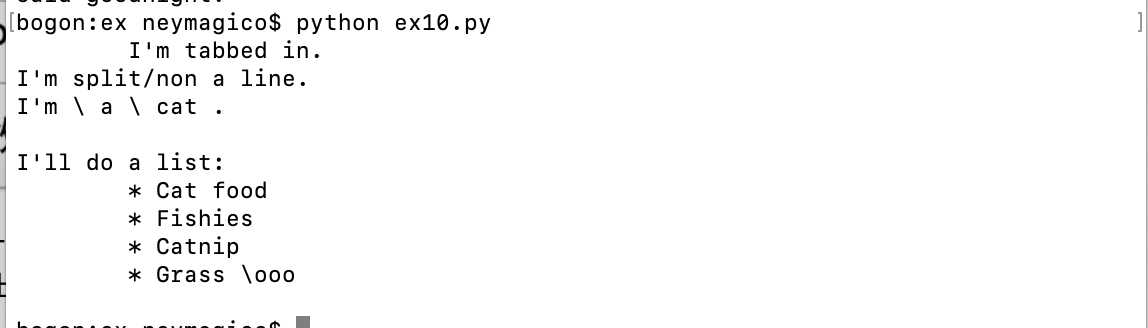
终端运行结果如下:
------------------------------------<习题11&12:raw_input()>---------------------------------------
讲真的,这个习题在一定程度上调动了我继续学下去的兴趣。我相信大家每天都会在网站、App、游戏等中,根据系统的提示,输入一些信息,可能是用户名、密码、电话号码等等,raw_input()就是起到这个作用。当python运行到这个命令时,python会提醒你输入一些信息。
鉴于这个习题的命令,需要本人输入才能体会到,我就不在这里插入终端运行结果了。
其实它非常的简单,但是需要你亲手运行一下ex11.py和ex12.py才能感受得到。代码如下:
                 1
                print
                "
                How old are you?
                "
                ,

                 2 age = raw_input()
 3print"How tall are you?",
 4 height = raw_input()
 5print"How much do you weight?",
 6 weight = raw_input()
 7 8print"so, you‘re %r old, %r tall and %r heavy." % ( age, height, weight)
 91011# Differences between input() and raw_input()12print"How old are you?",
13 age = input()
14print"How tall are you?",
15 height = input()
16print"How much do you weight?",
17 weight = input()
1819print"so, you‘re %r old, %r tall and %r heavy." % ( age, height, weight)
raw_input()命令在运行时,我们可以在括号内写一些提示,可以提示用户需要输入哪些方面的信息。例如ex11_1.py
                1
                #
                 print "What‘s her name?",
                2 name = raw_input("name?")
3print"How many years you have known her?", # 这个逗号,可以让你输入的信息,紧接着这个问题,而不是换行。。4 yars = raw_input("Years?")
5print"Is she beautiful?",
6 answer = raw_input("yes or no?")
7print"Do you like her or not?",
8 answer = raw_input("yes or no?")
raw_input()、int(raw_input())、input()的区别: 解释见ex11_2.py代码
                 1
                #
                -*-coding:utf-8-*-
                 2
                 3
                print
                ‘
                x
                ‘
                ,

                 4 x = int(raw_input())  #只能输入数字, 否者会报错终止脚本运行 5 6print‘y‘,
 7 y = raw_input() #既能输入数字,也能输入字符 8 9print‘z‘,
10 name = ‘Neymagico‘11 z = input() #既能输入数字,也能输入字符, 但是字符被python认为是个变量,需要对其定义12#如果输入未定义的字符,会报错
这一章就写到这吧,因为下一章是关于参数、解包和变量相关的代码,我本人也不是特别熟,想多用些篇幅再学一遍!
今天是父亲节,我用raw_input()写一段小代码,表达一下对父亲的感恩之情!
                 1
                from sys import exit
 2 3 4print"Please write the words which you want to say to your father in his day!" 5 grate = []
 6 7def respect():
 8 91011     words = raw_input()
1213if words != ‘stop‘:
1415        grate.append(words)
16print grate
17        respect()
1819else:
20         quit("ok, That‘s all to my father")
2122def quit(why):
23print why
24    exit(0)
2526 respect()
祝全天下的父亲节日快乐!!!!!!!
第八章预告:参数、解包和变量、提示和传递、读取文件、读写文件
原文:https://www.cnblogs.com/la-route-d-ingenieur/p/11032434.html
【说明】:本文章由站长整理发布,文章内容不代表本站观点,如文中有侵权行为,请与本站客服联系(QQ:254677821)!