-
Install Python (https://www.python.org/),download the latest Python version
-
Configure environment variables. (Example), I installed Python under /installation folder with Python 3.5.2. The path set is as follows:
D:installationPython3.5.2;D:installationPython3.5.2Scripts;
-
Install pip (you may search related steps from internet to install)
(locate to /Scripts folder, to perform easy_install pip command
-
If installation success, type pip command to check
-
Install selenium. To perform command pip install -U selenium
-
Till now, Python and Selenium have been installed successfully, then you are able to create Python code to drive browser. Here we using Edge browser to check.
-
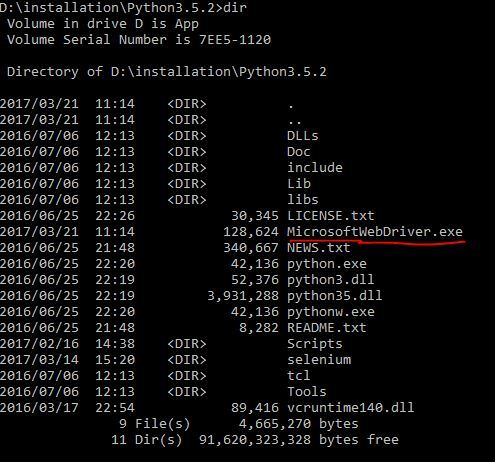
Before you do, you need to download Edge driver (https://developer.microsoft.com/en-us/microsoft-edge/tools/webdriver/) and put it on Python installation foloder (D:installationPython3.5.2)
-
from selenium import webdriver
driver = webdriver.Edge()
driver.get("https://www.baidu.com")
print("width:600,height:800")
driver.set_window_size(600,800)
driver.quit()
 650) this.width=650;" title="easy.JPG" src="/upload/getfiles/default/2022/11/10/20221110033002084.jpg" />
 650) this.width=650;" title="pip.JPG" src="/upload/getfiles/default/2022/11/10/20221110033002352.jpg" />
 650) this.width=650;" title="selenium.JPG" src="/upload/getfiles/default/2022/11/10/20221110033002767.jpg" />
 650) this.width=650;" title="driver.JPG" src="/upload/getfiles/default/2022/11/10/20221110033002984.jpg" />
-
查看一下源代码,看看上面这段代码是如何工作的
首先在 lib 目录下有一个 site-packages 的文件夹,下面有一个 selenium 的目录
D:installationPython3.5.2Libsite-packagesselenium,selenium目录下有一个webdriver的目录,里面是支持的各个浏览器
 650) this.width=650;" title="1.png" src="/upload/getfiles/default/2022/11/10/20221110033003274.jpg" />
这个是 __init__.py 的代码
 650) this.width=650;" title="2.png" src="/upload/getfiles/default/2022/11/10/20221110033003553.jpg" />
从当前目录导入 WebDriver 类,然后给它一个别名,如 Edge (对应的代码调用就是 webdriver.Edge(), 不然就应当写成 webdriver.WebDriver())
打开 WebDriver 类的代码,如图所示
 650) this.width=650;" title="3.png" src="/upload/getfiles/default/2022/11/10/20221110033003894.jpg" />
有两个方法,一个是初始 __init__ ,一个是 quit ,调用 Edge() 后就执行 __init__ 方法,最后关闭 edge 时调用 quit() 方法
本文出自 “WayToGo” 博客,请务必保留此出处http://waytogo.blog.51cto.com/12732809/1908750
原文:http://waytogo.blog.51cto.com/12732809/1908750
【说明】:本文章由站长整理发布,文章内容不代表本站观点,如文中有侵权行为,请与本站客服联系(QQ:254677821)!