1-Hyper –V 复制
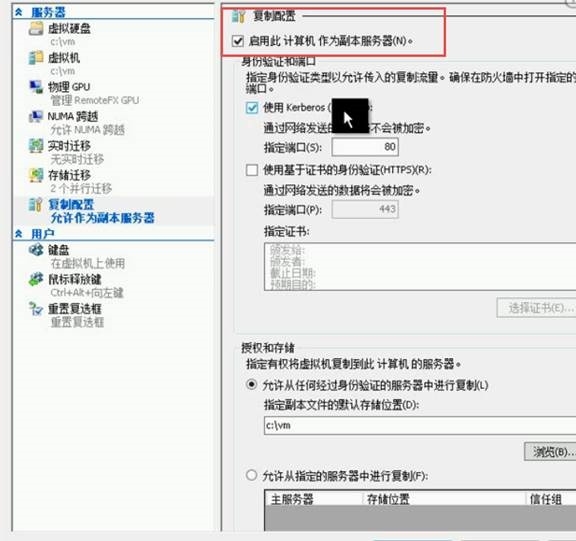
Hyper-V 3.0提供的复制特性,允许管理员为现有的虚拟机创建副本,提供了一种简单而实用的故障转移和灾难恢复的方案
650) this.width=650;" title="clip_image002" border="0" alt="clip_image002" src="http://s3.51cto.com/wyfs02/M02/6C/78/wKiom1VJ1YbTbHbbAAGpD7vN1pM884.jpg" "580" height="545" />' ref='nofollow'>![技术分享]() 650) this.width=650;" title="clip_image002" border="0" alt="clip_image002" src="http://s3.51cto.com/wyfs02/M02/6C/78/wKiom1VJ1YbTbHbbAAGpD7vN1pM884.jpg" "580" height="545" />
650) this.width=650;" title="clip_image002" border="0" alt="clip_image002" src="http://s3.51cto.com/wyfs02/M02/6C/78/wKiom1VJ1YbTbHbbAAGpD7vN1pM884.jpg" "580" height="545" />
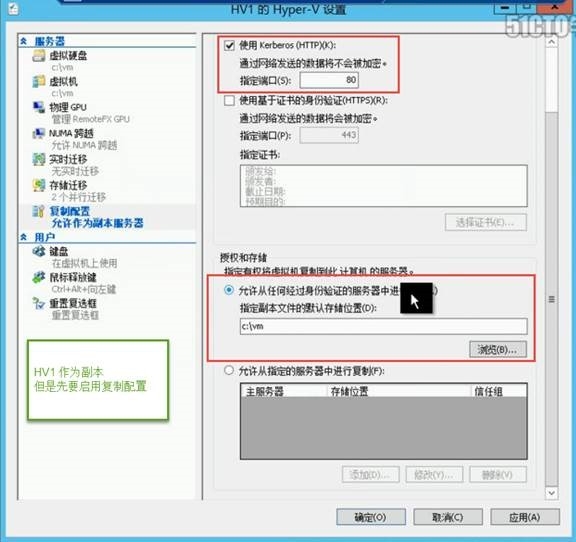
650) this.width=650;" title="clip_image004" border="0" alt="clip_image004" src="http://s3.51cto.com/wyfs02/M01/6C/74/wKioL1VJ1vniymNFAAHAq5Wt-Gw189.jpg" "580" height="546" />' ref='nofollow'>![技术分享]() 650) this.width=650;" title="clip_image004" border="0" alt="clip_image004" src="http://s3.51cto.com/wyfs02/M01/6C/74/wKioL1VJ1vniymNFAAHAq5Wt-Gw189.jpg" "580" height="546" />
650) this.width=650;" title="clip_image004" border="0" alt="clip_image004" src="http://s3.51cto.com/wyfs02/M01/6C/74/wKioL1VJ1vniymNFAAHAq5Wt-Gw189.jpg" "580" height="546" />
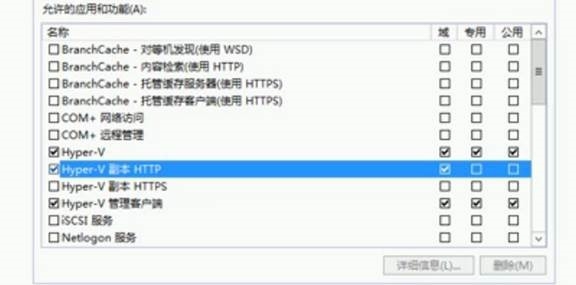
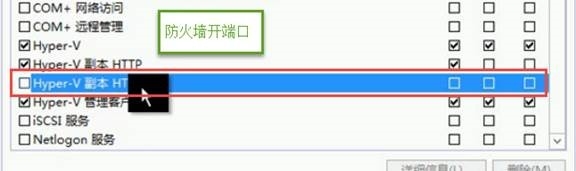
防火墙允许
650) this.width=650;" title="clip_image006" border="0" alt="clip_image006" src="http://s3.51cto.com/wyfs02/M02/6C/74/wKioL1VJ1vqgWxn-AADlZi6rhS0152.jpg" "580" height="289" />' ref='nofollow'>![技术分享]() 650) this.width=650;" title="clip_image006" border="0" alt="clip_image006" src="http://s3.51cto.com/wyfs02/M02/6C/74/wKioL1VJ1vqgWxn-AADlZi6rhS0152.jpg" "580" height="289" />
650) this.width=650;" title="clip_image006" border="0" alt="clip_image006" src="http://s3.51cto.com/wyfs02/M02/6C/74/wKioL1VJ1vqgWxn-AADlZi6rhS0152.jpg" "580" height="289" />
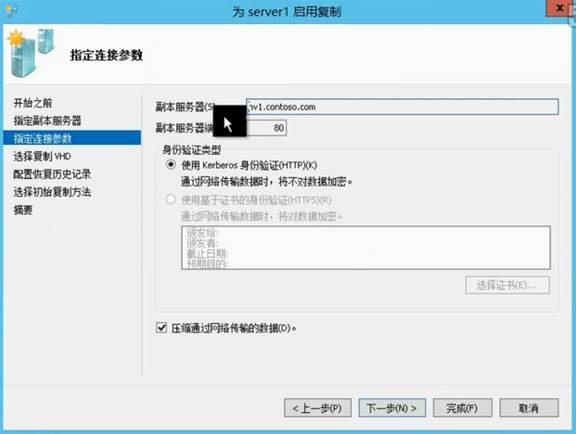
HV2 启用复制,指定HV1 ,复制到HV1
650) this.width=650;" title="clip_image008" border="0" alt="clip_image008" src="http://s3.51cto.com/wyfs02/M00/6C/74/wKioL1VJ1vuQ1MQKAAEHFk2Q0_4573.jpg" "580" height="438" />' ref='nofollow'>![技术分享]() 650) this.width=650;" title="clip_image008" border="0" alt="clip_image008" src="http://s3.51cto.com/wyfs02/M00/6C/74/wKioL1VJ1vuQ1MQKAAEHFk2Q0_4573.jpg" "580" height="438" />
650) this.width=650;" title="clip_image008" border="0" alt="clip_image008" src="http://s3.51cto.com/wyfs02/M00/6C/74/wKioL1VJ1vuQ1MQKAAEHFk2Q0_4573.jpg" "580" height="438" />
察看复制状态
650) this.width=650;" title="clip_image010" border="0" alt="clip_image010" src="http://s3.51cto.com/wyfs02/M01/6C/74/wKioL1VJ1vzynn7xAABoTwI5Al0474.jpg" "580" height="113" />' ref='nofollow'>![技术分享]() 650) this.width=650;" title="clip_image010" border="0" alt="clip_image010" src="http://s3.51cto.com/wyfs02/M01/6C/74/wKioL1VJ1vzynn7xAABoTwI5Al0474.jpg" "580" height="113" />
650) this.width=650;" title="clip_image010" border="0" alt="clip_image010" src="http://s3.51cto.com/wyfs02/M01/6C/74/wKioL1VJ1vzynn7xAABoTwI5Al0474.jpg" "580" height="113" />
650) this.width=650;" title="clip_image012" border="0" alt="clip_image012" src="http://s3.51cto.com/wyfs02/M02/6C/74/wKioL1VJ1v2gKb0ZAACHZLYAGGE743.jpg" "580" height="172" />' ref='nofollow'>![技术分享]() 650) this.width=650;" title="clip_image012" border="0" alt="clip_image012" src="http://s3.51cto.com/wyfs02/M02/6C/74/wKioL1VJ1v2gKb0ZAACHZLYAGGE743.jpg" "580" height="172" />
650) this.width=650;" title="clip_image012" border="0" alt="clip_image012" src="http://s3.51cto.com/wyfs02/M02/6C/74/wKioL1VJ1v2gKb0ZAACHZLYAGGE743.jpg" "580" height="172" />
故障转移方式:
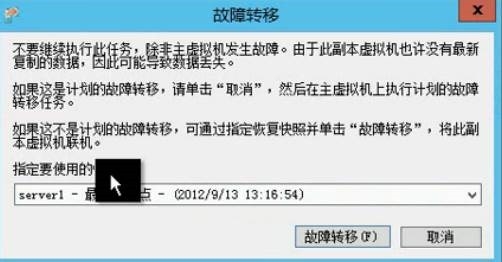
在HV2 上 ,选择计划故障转移
650) this.width=650;" title="clip_image014" border="0" alt="clip_image014" src="http://s3.51cto.com/wyfs02/M00/6C/74/wKioL1VJ1v7QTB0_AABUR5y_REE950.jpg" "249" height="211" />' ref='nofollow'>![技术分享]() 650) this.width=650;" title="clip_image014" border="0" alt="clip_image014" src="http://s3.51cto.com/wyfs02/M00/6C/74/wKioL1VJ1v7QTB0_AABUR5y_REE950.jpg" "249" height="211" />
650) this.width=650;" title="clip_image014" border="0" alt="clip_image014" src="http://s3.51cto.com/wyfs02/M00/6C/74/wKioL1VJ1v7QTB0_AABUR5y_REE950.jpg" "249" height="211" />
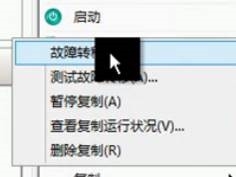
在HV1上也可以选择即时的故障转移
650) this.width=650;" title="clip_image016" border="0" alt="clip_image016" src="http://s3.51cto.com/wyfs02/M00/6C/74/wKioL1VJ1v6BL1qAAABH-uImj8E651.jpg" "240" height="181" />' ref='nofollow'>![技术分享]() 650) this.width=650;" title="clip_image016" border="0" alt="clip_image016" src="http://s3.51cto.com/wyfs02/M00/6C/74/wKioL1VJ1v6BL1qAAABH-uImj8E651.jpg" "240" height="181" />
650) this.width=650;" title="clip_image016" border="0" alt="clip_image016" src="http://s3.51cto.com/wyfs02/M00/6C/74/wKioL1VJ1v6BL1qAAABH-uImj8E651.jpg" "240" height="181" />
650) this.width=650;" title="clip_image018" border="0" alt="clip_image018" src="http://s3.51cto.com/wyfs02/M01/6C/74/wKioL1VJ1v_gw518AAD2qrcPQ5M198.jpg" "506" height="266" />' ref='nofollow'>![技术分享]() 650) this.width=650;" title="clip_image018" border="0" alt="clip_image018" src="http://s3.51cto.com/wyfs02/M01/6C/74/wKioL1VJ1v_gw518AAD2qrcPQ5M198.jpg" "506" height="266" />
650) this.width=650;" title="clip_image018" border="0" alt="clip_image018" src="http://s3.51cto.com/wyfs02/M01/6C/74/wKioL1VJ1v_gw518AAD2qrcPQ5M198.jpg" "506" height="266" />
反向复制:
就是HV1 作为主服务器了,HV2 作了副本服务器
650) this.width=650;" title="clip_image020" border="0" alt="clip_image020" src="http://s3.51cto.com/wyfs02/M02/6C/74/wKioL1VJ1wCjGTSdAAA-vU1yZNA625.jpg" "239" height="132" />' ref='nofollow'>![技术分享]() 650) this.width=650;" title="clip_image020" border="0" alt="clip_image020" src="http://s3.51cto.com/wyfs02/M02/6C/74/wKioL1VJ1wCjGTSdAAA-vU1yZNA625.jpg" "239" height="132" />
650) this.width=650;" title="clip_image020" border="0" alt="clip_image020" src="http://s3.51cto.com/wyfs02/M02/6C/74/wKioL1VJ1wCjGTSdAAA-vU1yZNA625.jpg" "239" height="132" />
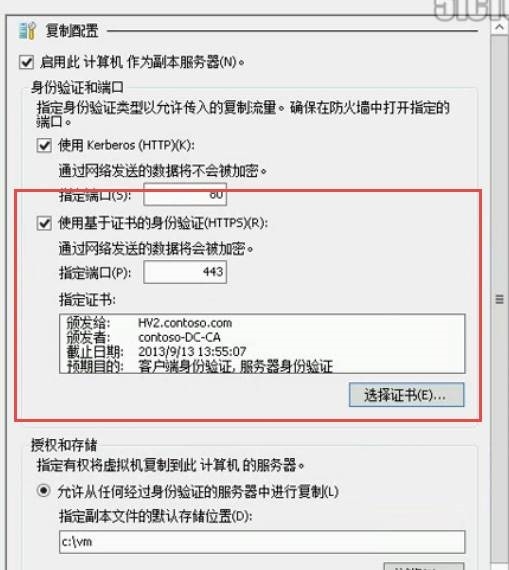
Hyper-V 不仅仅给用户提供了一种简单高效的灾难恢复方案,同时在安全性上支持证书身份验证,在副本初始化时,也提供了离线副本的选项,适用于真实的生产环境
可以利用证书复制
650) this.width=650;" title="clip_image022" border="0" alt="clip_image022" src="http://s3.51cto.com/wyfs02/M01/6C/74/wKioL1VJ1wGQZFsLAAG4SLVXvLM047.jpg" "513" height="574" />' ref='nofollow'>![技术分享]() 650) this.width=650;" title="clip_image022" border="0" alt="clip_image022" src="http://s3.51cto.com/wyfs02/M01/6C/74/wKioL1VJ1wGQZFsLAAG4SLVXvLM047.jpg" "513" height="574" />
650) this.width=650;" title="clip_image022" border="0" alt="clip_image022" src="http://s3.51cto.com/wyfs02/M01/6C/74/wKioL1VJ1wGQZFsLAAG4SLVXvLM047.jpg" "513" height="574" />
650) this.width=650;" title="clip_image024" border="0" alt="clip_image024" src="http://s3.51cto.com/wyfs02/M00/6C/78/wKiom1VJ1ZCg4y7sAACzM-w_gMc004.jpg" "580" height="175" />' ref='nofollow'>![技术分享]() 650) this.width=650;" title="clip_image024" border="0" alt="clip_image024" src="http://s3.51cto.com/wyfs02/M00/6C/78/wKiom1VJ1ZCg4y7sAACzM-w_gMc004.jpg" "580" height="175" />
650) this.width=650;" title="clip_image024" border="0" alt="clip_image024" src="http://s3.51cto.com/wyfs02/M00/6C/78/wKiom1VJ1ZCg4y7sAACzM-w_gMc004.jpg" "580" height="175" />
2-Hyper V 在线移动
虚拟机运行,需要主机计算资源和存储资源,而在 Hyper-V 3.0 中,管理员可以根椐需要,非常轻松地随时地对于虚拟机进行自由的移动,包括主机资源的移动和存储资源的移动,并且虚拟机移动过程中,并不会中断提供的服务,实现了实时迁移
650) this.width=650;" title="clip_image026" border="0" alt="clip_image026" src="http://s3.51cto.com/wyfs02/M01/6C/78/wKiom1VJ1ZLjb5irAAGUAWWeUM0886.jpg" "580" height="530" />' ref='nofollow'>![技术分享]() 650) this.width=650;" title="clip_image026" border="0" alt="clip_image026" src="http://s3.51cto.com/wyfs02/M01/6C/78/wKiom1VJ1ZLjb5irAAGUAWWeUM0886.jpg" "580" height="530" />
650) this.width=650;" title="clip_image026" border="0" alt="clip_image026" src="http://s3.51cto.com/wyfs02/M01/6C/78/wKiom1VJ1ZLjb5irAAGUAWWeUM0886.jpg" "580" height="530" />
650) this.width=650;" title="clip_image028" border="0" alt="clip_image028" src="http://s3.51cto.com/wyfs02/M01/6C/78/wKiom1VJ1ZPT0rUdAACVY20egu8294.jpg" "580" height="263" />' ref='nofollow'>![技术分享]() 650) this.width=650;" title="clip_image028" border="0" alt="clip_image028" src="http://s3.51cto.com/wyfs02/M01/6C/78/wKiom1VJ1ZPT0rUdAACVY20egu8294.jpg" "580" height="263" />
650) this.width=650;" title="clip_image028" border="0" alt="clip_image028" src="http://s3.51cto.com/wyfs02/M01/6C/78/wKiom1VJ1ZPT0rUdAACVY20egu8294.jpg" "580" height="263" />
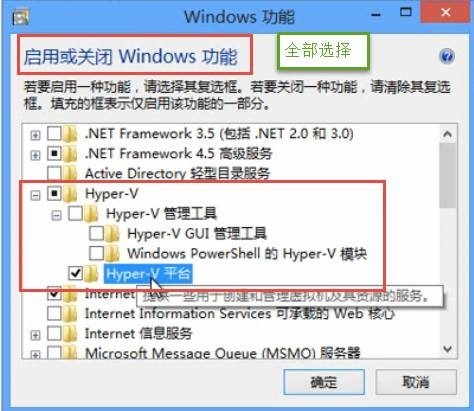
3-客户端启用Hyper-V
在 Windows 8 系统之上,用户可以轻松启用集成的 Hyper-V 虚拟化平台,相比于 Virtual PC,更快更高效地构建各种测试或是演示环境
条件:win8 企版本和专业版 64位系统
650) this.width=650;" title="clip_image030" border="0" alt="clip_image030" src="http://s3.51cto.com/wyfs02/M00/6C/74/wKioL1VJ1wbCIiEhAAGa0zjsztY349.jpg" "478" height="415" />' ref='nofollow'>![技术分享]() 650) this.width=650;" title="clip_image030" border="0" alt="clip_image030" src="http://s3.51cto.com/wyfs02/M00/6C/74/wKioL1VJ1wbCIiEhAAGa0zjsztY349.jpg" "478" height="415" />
650) this.width=650;" title="clip_image030" border="0" alt="clip_image030" src="http://s3.51cto.com/wyfs02/M00/6C/74/wKioL1VJ1wbCIiEhAAGa0zjsztY349.jpg" "478" height="415" />
4-导入导出虚拟机
Hyper-V 3.0中,虚拟机的导入和导出功能得到进一步的增强,管理员将虚拟机导入到目标服务器之前,不必需在源服务器上导出,它同时提供一个更强大的导入向导,智能地修复可能出现的各种问题
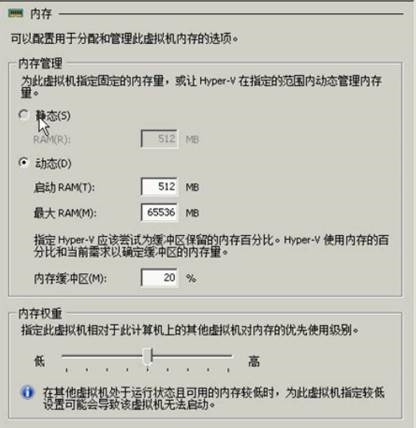
5-Hyper-V动态内存改进
从 Windows Server 2008 R2 SP1 开始,Hyper-V 提供了动态内存的特性,以便使 Hyper-V 虚拟机平台能够更加适用于虚拟桌面VDI方案,而在 Windows Server 2012 的 Hyper-V 3.0 中,对于动态内存提供了最低 RAM 选项,进一步提高内存利用率,运行更多的虚拟桌面。
Hyper-V2
650) this.width=650;" title="clip_image032" border="0" alt="clip_image032" src="http://s3.51cto.com/wyfs02/M01/6C/74/wKioL1VJ1wfBCbV7AAD3yVytSvE259.jpg" "420" height="432" />' ref='nofollow'>![技术分享]() 650) this.width=650;" title="clip_image032" border="0" alt="clip_image032" src="http://s3.51cto.com/wyfs02/M01/6C/74/wKioL1VJ1wfBCbV7AAD3yVytSvE259.jpg" "420" height="432" />
650) this.width=650;" title="clip_image032" border="0" alt="clip_image032" src="http://s3.51cto.com/wyfs02/M01/6C/74/wKioL1VJ1wfBCbV7AAD3yVytSvE259.jpg" "420" height="432" />
Hyper-V 3.0 的版本有改进
650) this.width=650;" title="clip_image034" border="0" alt="clip_image034" src="http://s3.51cto.com/wyfs02/M02/6C/74/wKioL1VJ1wnBkpQfAAFZraV5MIk161.jpg" "529" height="534" />' ref='nofollow'>![技术分享]() 650) this.width=650;" title="clip_image034" border="0" alt="clip_image034" src="http://s3.51cto.com/wyfs02/M02/6C/74/wKioL1VJ1wnBkpQfAAFZraV5MIk161.jpg" "529" height="534" />
650) this.width=650;" title="clip_image034" border="0" alt="clip_image034" src="http://s3.51cto.com/wyfs02/M02/6C/74/wKioL1VJ1wnBkpQfAAFZraV5MIk161.jpg" "529" height="534" />
6-Hyper-V快照管理
使用 Hyper-V 的快照功能,管理员可以方便的保留当前虚拟机的运行状态,在Hyper-v2.0,删除快照的时候并没有彻底删除文件,会留有avhb的文件,等虚拟机真正关闭的时候,Hyperv2.0 才会合并掉avhb,最后进行快照删除
而在 Windows Server 2012 中,对于快照的删除,将立即完成合并,简化快照文件管理
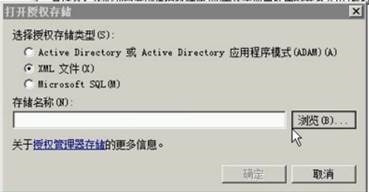
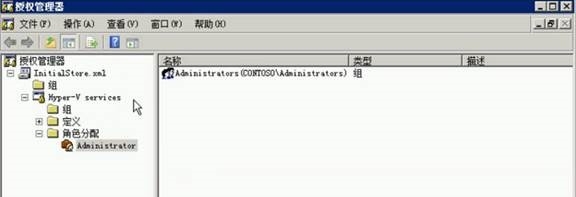
7-授权简化
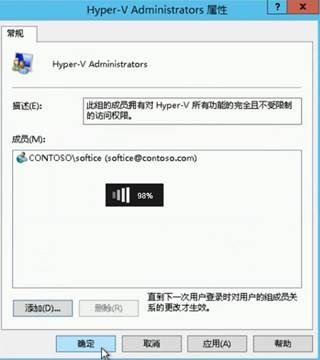
在 Windows Server 2012 中,Hyper-V 3.0 新增了 Hyper-V 管理员的安全组,管理员可以轻松地将用户添加到该安全组中,完成 Hyper-V 管理权限的委派。
方式1: 启用arman.msc 命令
650) this.width=650;" title="clip_image036" border="0" alt="clip_image036" src="http://s3.51cto.com/wyfs02/M02/6C/78/wKiom1VJ1Zizg8d_AABozIoFXQk903.jpg" "373" height="196" />' ref='nofollow'>![技术分享]() 650) this.width=650;" title="clip_image036" border="0" alt="clip_image036" src="http://s3.51cto.com/wyfs02/M02/6C/78/wKiom1VJ1Zizg8d_AABozIoFXQk903.jpg" "373" height="196" />
650) this.width=650;" title="clip_image036" border="0" alt="clip_image036" src="http://s3.51cto.com/wyfs02/M02/6C/78/wKiom1VJ1Zizg8d_AABozIoFXQk903.jpg" "373" height="196" />
650) this.width=650;" title="clip_image038" border="0" alt="clip_image038" src="http://s3.51cto.com/wyfs02/M00/6C/78/wKiom1VJ1Znh481XAADxuaLhEV8164.jpg" "580" height="240" />' ref='nofollow'>![技术分享]() 650) this.width=650;" title="clip_image038" border="0" alt="clip_image038" src="http://s3.51cto.com/wyfs02/M00/6C/78/wKiom1VJ1Znh481XAADxuaLhEV8164.jpg" "580" height="240" />
650) this.width=650;" title="clip_image038" border="0" alt="clip_image038" src="http://s3.51cto.com/wyfs02/M00/6C/78/wKiom1VJ1Znh481XAADxuaLhEV8164.jpg" "580" height="240" />
650) this.width=650;" title="clip_image040" border="0" alt="clip_image040" src="http://s3.51cto.com/wyfs02/M01/6C/78/wKiom1VJ1Zvwv7KeAACTgix8Hqk265.jpg" "580" height="201" />' ref='nofollow'>![技术分享]() 650) this.width=650;" title="clip_image040" border="0" alt="clip_image040" src="http://s3.51cto.com/wyfs02/M01/6C/78/wKiom1VJ1Zvwv7KeAACTgix8Hqk265.jpg" "580" height="201" />
650) this.width=650;" title="clip_image040" border="0" alt="clip_image040" src="http://s3.51cto.com/wyfs02/M01/6C/78/wKiom1VJ1Zvwv7KeAACTgix8Hqk265.jpg" "580" height="201" />
方式2: 本地组
650) this.width=650;" title="clip_image042" border="0" alt="clip_image042" src="http://s3.51cto.com/wyfs02/M02/6C/78/wKiom1VJ1Z-irTGlAACn13LP5TQ623.jpg" "324" height="364" />' ref='nofollow'>![技术分享]() 650) this.width=650;" title="clip_image042" border="0" alt="clip_image042" src="http://s3.51cto.com/wyfs02/M02/6C/78/wKiom1VJ1Z-irTGlAACn13LP5TQ623.jpg" "324" height="364" />
650) this.width=650;" title="clip_image042" border="0" alt="clip_image042" src="http://s3.51cto.com/wyfs02/M02/6C/78/wKiom1VJ1Z-irTGlAACn13LP5TQ623.jpg" "324" height="364" />
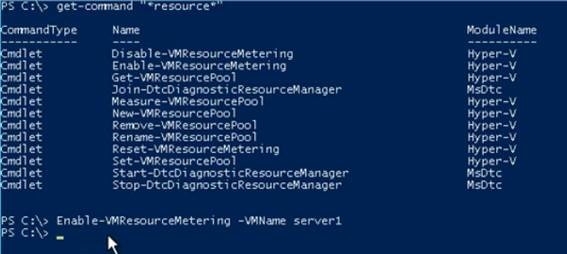
7-Hyper-V资源计量
在 Windows Server 2012 中,管理员可以对于运行在 Hyper-V 平台之上的虚拟机进行资源计量,获取 CPU,内存,磁盘等使用信息
650) this.width=650;" title="clip_image044" border="0" alt="clip_image044" src="http://s3.51cto.com/wyfs02/M00/6C/74/wKioL1VJ1xKAvmiRAAEPveR5j1A977.jpg" "571" height="258" />' ref='nofollow'>![技术分享]() 650) this.width=650;" title="clip_image044" border="0" alt="clip_image044" src="http://s3.51cto.com/wyfs02/M00/6C/74/wKioL1VJ1xKAvmiRAAEPveR5j1A977.jpg" "571" height="258" />
650) this.width=650;" title="clip_image044" border="0" alt="clip_image044" src="http://s3.51cto.com/wyfs02/M00/6C/74/wKioL1VJ1xKAvmiRAAEPveR5j1A977.jpg" "571" height="258" />
650) this.width=650;" title="clip_image046" border="0" alt="clip_image046" src="http://s3.51cto.com/wyfs02/M01/6C/74/wKioL1VJ1xLQPV1rAABpDeodkmg181.jpg" "580" height="124" />' ref='nofollow'>![技术分享]() 650) this.width=650;" title="clip_image046" border="0" alt="clip_image046" src="http://s3.51cto.com/wyfs02/M01/6C/74/wKioL1VJ1xLQPV1rAABpDeodkmg181.jpg" "580" height="124" />
650) this.width=650;" title="clip_image046" border="0" alt="clip_image046" src="http://s3.51cto.com/wyfs02/M01/6C/74/wKioL1VJ1xLQPV1rAABpDeodkmg181.jpg" "580" height="124" />
8-Hyper-V over SMB
在 Windows Server 2012 中,SMB 3 支持存储 Hyper-V 虚拟机文件,它将不再是作为库服务器存储静态的文件,而是支持存储正在运行的虚拟机的文件,大大简化了 Hyper-V 运行环境的构建
650) this.width=650;" title="clip_image048" border="0" alt="clip_image048" src="http://s3.51cto.com/wyfs02/M02/6C/74/wKioL1VJ1xOTCiTEAACdeyRVrow554.jpg" "580" height="198" />' ref='nofollow'>![技术分享]() 650) this.width=650;" title="clip_image048" border="0" alt="clip_image048" src="http://s3.51cto.com/wyfs02/M02/6C/74/wKioL1VJ1xOTCiTEAACdeyRVrow554.jpg" "580" height="198" />
650) this.width=650;" title="clip_image048" border="0" alt="clip_image048" src="http://s3.51cto.com/wyfs02/M02/6C/74/wKioL1VJ1xOTCiTEAACdeyRVrow554.jpg" "580" height="198" />
650) this.width=650;" title="clip_image050" border="0" alt="clip_image050" src="http://s3.51cto.com/wyfs02/M00/6C/79/wKiom1VJ1aPSsfTmAACU4WJgoVo231.jpg" "580" height="119" />' ref='nofollow'>![技术分享]() 650) this.width=650;" title="clip_image050" border="0" alt="clip_image050" src="http://s3.51cto.com/wyfs02/M00/6C/79/wKiom1VJ1aPSsfTmAACU4WJgoVo231.jpg" "580" height="119" />
650) this.width=650;" title="clip_image050" border="0" alt="clip_image050" src="http://s3.51cto.com/wyfs02/M00/6C/79/wKiom1VJ1aPSsfTmAACU4WJgoVo231.jpg" "580" height="119" />
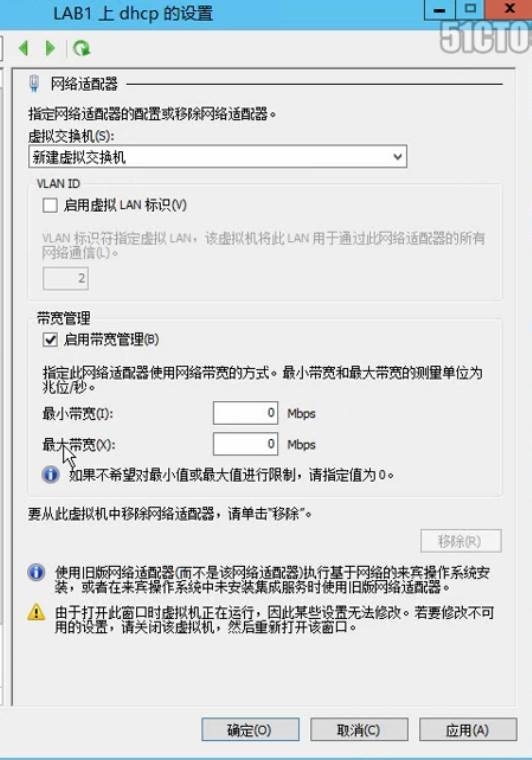
9-Hyper V 虚拟交换机
在 Windows Server 2012 中,Hyper-V 的虚拟交换机新增了带宽管理,IPSec 任务卸载,单根I/O虚拟化,DHCP 防护等新特性,同时,它也提供了开放式的编程接口,方便用户来扩展虚拟交换机的功能
650) this.width=650;" title="clip_image052" border="0" alt="clip_image052" src="http://s3.51cto.com/wyfs02/M00/6C/74/wKioL1VJ1xbhTuqWAAISCr0QD60159.jpg" "536" height="764" />' ref='nofollow'>![技术分享]() 650) this.width=650;" title="clip_image052" border="0" alt="clip_image052" src="http://s3.51cto.com/wyfs02/M00/6C/74/wKioL1VJ1xbhTuqWAAISCr0QD60159.jpg" "536" height="764" />
650) this.width=650;" title="clip_image052" border="0" alt="clip_image052" src="http://s3.51cto.com/wyfs02/M00/6C/74/wKioL1VJ1xbhTuqWAAISCr0QD60159.jpg" "536" height="764" />
650) this.width=650;" title="clip_image054" border="0" alt="clip_image054" src="http://s3.51cto.com/wyfs02/M00/6C/79/wKiom1VJ1aajGvLwAAGhzwwIJqY482.jpg" "533" height="549" />' ref='nofollow'>![技术分享]() 650) this.width=650;" title="clip_image054" border="0" alt="clip_image054" src="http://s3.51cto.com/wyfs02/M00/6C/79/wKiom1VJ1aajGvLwAAGhzwwIJqY482.jpg" "533" height="549" />
650) this.width=650;" title="clip_image054" border="0" alt="clip_image054" src="http://s3.51cto.com/wyfs02/M00/6C/79/wKiom1VJ1aajGvLwAAGhzwwIJqY482.jpg" "533" height="549" />
650) this.width=650;" title="clip_image056" border="0" alt="clip_image056" src="http://s3.51cto.com/wyfs02/M01/6C/79/wKiom1VJ1ajSWvCzAAI2OOJaewY582.jpg" "531" height="727" />' ref='nofollow'>![技术分享]() 650) this.width=650;" title="clip_image056" border="0" alt="clip_image056" src="http://s3.51cto.com/wyfs02/M01/6C/79/wKiom1VJ1ajSWvCzAAI2OOJaewY582.jpg" "531" height="727" />
650) this.width=650;" title="clip_image056" border="0" alt="clip_image056" src="http://s3.51cto.com/wyfs02/M01/6C/79/wKiom1VJ1ajSWvCzAAI2OOJaewY582.jpg" "531" height="727" />
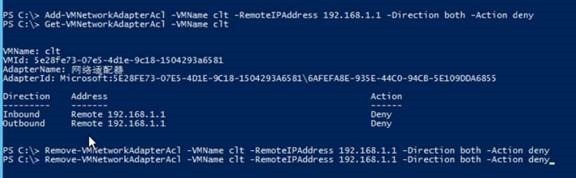
同时我们也可以做网络的访问控制列表
650) this.width=650;" title="clip_image058" border="0" alt="clip_image058" src="http://s3.51cto.com/wyfs02/M02/6C/79/wKiom1VJ1aqinTSsAAE21VTsT2Y752.jpg" "580" height="241" />' ref='nofollow'>![技术分享]() 650) this.width=650;" title="clip_image058" border="0" alt="clip_image058" src="http://s3.51cto.com/wyfs02/M02/6C/79/wKiom1VJ1aqinTSsAAE21VTsT2Y752.jpg" "580" height="241" />
650) this.width=650;" title="clip_image058" border="0" alt="clip_image058" src="http://s3.51cto.com/wyfs02/M02/6C/79/wKiom1VJ1aqinTSsAAE21VTsT2Y752.jpg" "580" height="241" />
650) this.width=650;" title="clip_image060" border="0" alt="clip_image060" src="http://s3.51cto.com/wyfs02/M00/6C/79/wKiom1VJ1auALRagAADmRK5RwMw027.jpg" "580" height="182" />' ref='nofollow'>![技术分享]() 650) this.width=650;" title="clip_image060" border="0" alt="clip_image060" src="http://s3.51cto.com/wyfs02/M00/6C/79/wKiom1VJ1auALRagAADmRK5RwMw027.jpg" "580" height="182" />
650) this.width=650;" title="clip_image060" border="0" alt="clip_image060" src="http://s3.51cto.com/wyfs02/M00/6C/79/wKiom1VJ1auALRagAADmRK5RwMw027.jpg" "580" height="182" />
原文:http://ericfu.blog.51cto.com/416760/1643495
 650) this.width=650;" title="clip_image004" border="0" alt="clip_image004" src="http://s3.51cto.com/wyfs02/M01/6C/74/wKioL1VJ1vniymNFAAHAq5Wt-Gw189.jpg" "580" height="546" />
 650) this.width=650;" title="clip_image006" border="0" alt="clip_image006" src="http://s3.51cto.com/wyfs02/M02/6C/74/wKioL1VJ1vqgWxn-AADlZi6rhS0152.jpg" "580" height="289" />
 650) this.width=650;" title="clip_image008" border="0" alt="clip_image008" src="http://s3.51cto.com/wyfs02/M00/6C/74/wKioL1VJ1vuQ1MQKAAEHFk2Q0_4573.jpg" "580" height="438" />
 650) this.width=650;" title="clip_image010" border="0" alt="clip_image010" src="http://s3.51cto.com/wyfs02/M01/6C/74/wKioL1VJ1vzynn7xAABoTwI5Al0474.jpg" "580" height="113" />
 650) this.width=650;" title="clip_image012" border="0" alt="clip_image012" src="http://s3.51cto.com/wyfs02/M02/6C/74/wKioL1VJ1v2gKb0ZAACHZLYAGGE743.jpg" "580" height="172" />
 650) this.width=650;" title="clip_image014" border="0" alt="clip_image014" src="http://s3.51cto.com/wyfs02/M00/6C/74/wKioL1VJ1v7QTB0_AABUR5y_REE950.jpg" "249" height="211" />
 650) this.width=650;" title="clip_image016" border="0" alt="clip_image016" src="http://s3.51cto.com/wyfs02/M00/6C/74/wKioL1VJ1v6BL1qAAABH-uImj8E651.jpg" "240" height="181" />
 650) this.width=650;" title="clip_image018" border="0" alt="clip_image018" src="http://s3.51cto.com/wyfs02/M01/6C/74/wKioL1VJ1v_gw518AAD2qrcPQ5M198.jpg" "506" height="266" />
 650) this.width=650;" title="clip_image020" border="0" alt="clip_image020" src="http://s3.51cto.com/wyfs02/M02/6C/74/wKioL1VJ1wCjGTSdAAA-vU1yZNA625.jpg" "239" height="132" />
 650) this.width=650;" title="clip_image022" border="0" alt="clip_image022" src="http://s3.51cto.com/wyfs02/M01/6C/74/wKioL1VJ1wGQZFsLAAG4SLVXvLM047.jpg" "513" height="574" />
 650) this.width=650;" title="clip_image024" border="0" alt="clip_image024" src="http://s3.51cto.com/wyfs02/M00/6C/78/wKiom1VJ1ZCg4y7sAACzM-w_gMc004.jpg" "580" height="175" />
 650) this.width=650;" title="clip_image026" border="0" alt="clip_image026" src="http://s3.51cto.com/wyfs02/M01/6C/78/wKiom1VJ1ZLjb5irAAGUAWWeUM0886.jpg" "580" height="530" />
 650) this.width=650;" title="clip_image028" border="0" alt="clip_image028" src="http://s3.51cto.com/wyfs02/M01/6C/78/wKiom1VJ1ZPT0rUdAACVY20egu8294.jpg" "580" height="263" />
 650) this.width=650;" title="clip_image030" border="0" alt="clip_image030" src="http://s3.51cto.com/wyfs02/M00/6C/74/wKioL1VJ1wbCIiEhAAGa0zjsztY349.jpg" "478" height="415" />
 650) this.width=650;" title="clip_image032" border="0" alt="clip_image032" src="http://s3.51cto.com/wyfs02/M01/6C/74/wKioL1VJ1wfBCbV7AAD3yVytSvE259.jpg" "420" height="432" />
 650) this.width=650;" title="clip_image034" border="0" alt="clip_image034" src="http://s3.51cto.com/wyfs02/M02/6C/74/wKioL1VJ1wnBkpQfAAFZraV5MIk161.jpg" "529" height="534" />
 650) this.width=650;" title="clip_image036" border="0" alt="clip_image036" src="http://s3.51cto.com/wyfs02/M02/6C/78/wKiom1VJ1Zizg8d_AABozIoFXQk903.jpg" "373" height="196" />
 650) this.width=650;" title="clip_image038" border="0" alt="clip_image038" src="http://s3.51cto.com/wyfs02/M00/6C/78/wKiom1VJ1Znh481XAADxuaLhEV8164.jpg" "580" height="240" />
 650) this.width=650;" title="clip_image040" border="0" alt="clip_image040" src="http://s3.51cto.com/wyfs02/M01/6C/78/wKiom1VJ1Zvwv7KeAACTgix8Hqk265.jpg" "580" height="201" />
 650) this.width=650;" title="clip_image042" border="0" alt="clip_image042" src="http://s3.51cto.com/wyfs02/M02/6C/78/wKiom1VJ1Z-irTGlAACn13LP5TQ623.jpg" "324" height="364" />
 650) this.width=650;" title="clip_image044" border="0" alt="clip_image044" src="http://s3.51cto.com/wyfs02/M00/6C/74/wKioL1VJ1xKAvmiRAAEPveR5j1A977.jpg" "571" height="258" />
 650) this.width=650;" title="clip_image046" border="0" alt="clip_image046" src="http://s3.51cto.com/wyfs02/M01/6C/74/wKioL1VJ1xLQPV1rAABpDeodkmg181.jpg" "580" height="124" />
 650) this.width=650;" title="clip_image048" border="0" alt="clip_image048" src="http://s3.51cto.com/wyfs02/M02/6C/74/wKioL1VJ1xOTCiTEAACdeyRVrow554.jpg" "580" height="198" />
 650) this.width=650;" title="clip_image050" border="0" alt="clip_image050" src="http://s3.51cto.com/wyfs02/M00/6C/79/wKiom1VJ1aPSsfTmAACU4WJgoVo231.jpg" "580" height="119" />
 650) this.width=650;" title="clip_image052" border="0" alt="clip_image052" src="http://s3.51cto.com/wyfs02/M00/6C/74/wKioL1VJ1xbhTuqWAAISCr0QD60159.jpg" "536" height="764" />
 650) this.width=650;" title="clip_image054" border="0" alt="clip_image054" src="http://s3.51cto.com/wyfs02/M00/6C/79/wKiom1VJ1aajGvLwAAGhzwwIJqY482.jpg" "533" height="549" />
 650) this.width=650;" title="clip_image056" border="0" alt="clip_image056" src="http://s3.51cto.com/wyfs02/M01/6C/79/wKiom1VJ1ajSWvCzAAI2OOJaewY582.jpg" "531" height="727" />
 650) this.width=650;" title="clip_image058" border="0" alt="clip_image058" src="http://s3.51cto.com/wyfs02/M02/6C/79/wKiom1VJ1aqinTSsAAE21VTsT2Y752.jpg" "580" height="241" />
 650) this.width=650;" title="clip_image060" border="0" alt="clip_image060" src="http://s3.51cto.com/wyfs02/M00/6C/79/wKiom1VJ1auALRagAADmRK5RwMw027.jpg" "580" height="182" />