1.磁盘分区
在Linux系统中非常多的磁盘分区工具,比如命令方式的fdisk、parted、cfdisk和sfdisk,最常使用的是fdisk和parted。
1.1 使用fdisk命令磁盘分区实例
fdisk命令语法
fdisk 【选项】【设备】

fdisk交互式操作子命令

(1)进入fdisk,列出所有子命令


                 1 [root@test ~]# fdisk /dev/sda
 2 3 WARNING: DOS-compatible mode is deprecated. It‘s strongly recommended to 4          switch off the mode (command ‘c‘) and change display units to
 5          sectors (command ‘u‘).
 6 7 Command (m for help): m
 8Command action
 9   a   toggle a bootable flag
10   b   edit bsd disklabel
11   c   toggle the dos compatibility flag
12   d   delete a partition
13   l   list known partition types
14   m   print this menu
15   n   add a new partition
16   o   create a new empty DOS partition table
17   p   print the partition table
18   q   quit without saving changes
19   s   create a new empty Sun disklabel
20    t   change a partition‘s system id21    u   change display/entry units
22   v   verify the partition table
23wwrite table to disk and exit
24    x   extra functionality (experts only)
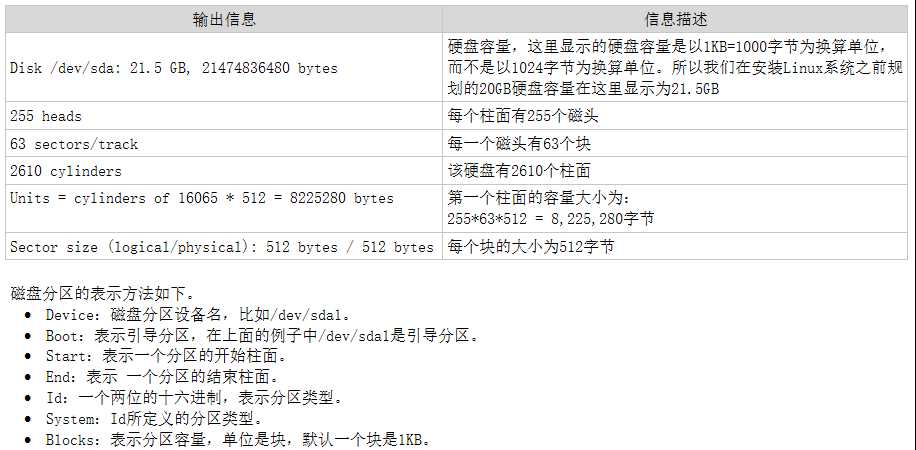
(2)显示硬盘分区信息
                 1 Command (m for help): p
 2 3 Disk /dev/sda: 21.5 GB, 21474836480 bytes
 4255 heads, 63 sectors/track, 2610 cylinders
 5 Units = cylinders of 16065 * 512 = 8225280 bytes
 6 Sector size (logical/physical): 512 bytes / 512 bytes
 7 I/O size (minimum/optimal): 512 bytes / 512 bytes
 8 Disk identifier: 0x0007b17a 910   Device Boot      Start         End      Blocks   Id  System
11 /dev/sda1   *           12620480083  Linux
12 Partition 1 does not end on cylinder boundary.
13 /dev/sda2              26261120765696   8e  Linux LVM
磁盘分区信息描述
(3)创建和删除主分区
                 1 Command (m for help): n
 2Command action
 3   e   extended
 4    p   primary partition (1-4)
 5p
 6 Partition number (1-4): 1 7 First cylinder (1-2610, default 1):
 8 Using default value 1 9 Last cylinder, +cylinders or +size{K,M,G} (1-2610, default 2610): +5G
1011 Command (m for help): p
1213 Disk /dev/sdb: 21.5 GB, 21474836480 bytes
14255 heads, 63 sectors/track, 2610 cylinders
15 Units = cylinders of 16065 * 512 = 8225280 bytes
16 Sector size (logical/physical): 512 bytes / 512 bytes
17 I/O size (minimum/optimal): 512 bytes / 512 bytes
18 Disk identifier: 0x9422e5861920   Device Boot      Start         End      Blocks   Id  System
21 /dev/sdb1               16545253223+  83  Linux
(4)创建扩展分区和逻辑驱动器
                 1 Command (m for help): n
 2Command action
 3   e   extended
 4    p   primary partition (1-4)
 5e
 6 Partition number (1-4): 2 7 First cylinder (655-2610, default 655):
 8 Using default value 655 9 Last cylinder, +cylinders or +size{K,M,G} (655-2610, default 2610):
10 Using default value 26101112 Command (m for help): p
1314 Disk /dev/sdb: 21.5 GB, 21474836480 bytes
15255 heads, 63 sectors/track, 2610 cylinders
16 Units = cylinders of 16065 * 512 = 8225280 bytes
17 Sector size (logical/physical): 512 bytes / 512 bytes
18 I/O size (minimum/optimal): 512 bytes / 512 bytes
19 Disk identifier: 0x9422e5862021   Device Boot      Start         End      Blocks   Id  System
22 /dev/sdb1               16545253223+  83  Linux
23 /dev/sdb2             6552610157115705  Extended
2425 Command (m for help): n
26Command action
27    l   logical (5 or over)
28    p   primary partition (1-4)
29l
30 First cylinder (655-2610, default 655):
31 Using default value 65532 Last cylinder, +cylinders or +size{K,M,G} (655-2610, default 2610): +5G
3334 Command (m for help): n
35Command action
36    l   logical (5 or over)
37    p   primary partition (1-4)
38l
39 First cylinder (1309-2610, default 1309):
40 Using default value 130941 Last cylinder, +cylinders or +size{K,M,G} (1309-2610, default 2610):
42 Using default value 26104344 Command (m for help): p
4546 Disk /dev/sdb: 21.5 GB, 21474836480 bytes
47255 heads, 63 sectors/track, 2610 cylinders
48 Units = cylinders of 16065 * 512 = 8225280 bytes
49 Sector size (logical/physical): 512 bytes / 512 bytes
50 I/O size (minimum/optimal): 512 bytes / 512 bytes
51 Disk identifier: 0x9422e5865253   Device Boot      Start         End      Blocks   Id  System
54 /dev/sdb1               16545253223+  83  Linux
55 /dev/sdb2             6552610157115705  Extended
56 /dev/sdb5             65513085253223+  83  Linux
57 /dev/sdb6            1309261010458283+  83  Linux
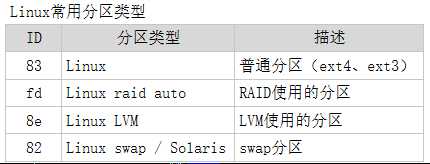
(5)查看并转换分区类型
                 1 Command (m for help): t
 2 Partition number (1-6): 5 3Hex code (type L to list codes): 8e
 4 Changed system type of partition 5 to 8e (Linux LVM)
 5 6 Command (m for help): p
 7 8 Disk /dev/sdb: 21.5 GB, 21474836480 bytes
 9255 heads, 63 sectors/track, 2610 cylinders
10 Units = cylinders of 16065 * 512 = 8225280 bytes
11 Sector size (logical/physical): 512 bytes / 512 bytes
12 I/O size (minimum/optimal): 512 bytes / 512 bytes
13 Disk identifier: 0x9422e5861415   Device Boot      Start         End      Blocks   Id  System
16 /dev/sdb1               16545253223+  83  Linux
17 /dev/sdb2             6552610157115705  Extended
18 /dev/sdb5             65513085253223+  8e  Linux LVM
19 /dev/sdb6            1309261010458283+  83  Linux
(6)保存分区设置信息,并退出fdisk
                1 Command (m for help): w2 The partition table has been altered!
34 Calling ioctl() to re-read partition table.
5 Syncing disks.
(7)重启计算机系统并查看分区
                1 [root@test ~]# ls /dev/sdb*
2 /dev/sdb  /dev/sdb1  /dev/sdb2  /dev/sdb5  /dev/sdb6
原文:http://www.cnblogs.com/fengyun11/p/6505545.html
【说明】:本文章由站长整理发布,文章内容不代表本站观点,如文中有侵权行为,请与本站客服联系(QQ:254677821)!