1. selinux教程
http://os.51cto.com/art/201209/355490.htm
2. selinux pdf电子书
http://pan.baidu.com/s/1jGGdExK

10.11 Linux网络相关
1. 安装 ifconfig 命令(centos7默认没安装):
[root@hao-01 ~]# yum install -y net-tools
2. 网卡当掉了,查看网卡ip:
[root@hao-01 ~]# ifconfig -a
3. 关闭 指定 网卡 并且 启动 网卡 : ifdown 网卡名称 && ifup 网卡名称
(更改网卡配置,只针对更改网卡重启,就用 关闭 并 重启 命令!千万不要随意当掉网卡!)
[root@hao-01 ~]# ifdown ens33 && ifup ens33
4. 设置 虚拟网卡 (拷贝网卡配置文件,并重命名):
cp /etc/sysconfig/network-scripts/ 原网卡 虚拟网卡
[root@hao-01 ~]# cp /etc/sysconfig/network-scripts/ ifcfg-ens33 /etc/sysconfig/network-scripts/ ifcfg-ens33:0
5. 编辑 虚拟网卡 :
[root@hao-01 ~]# vi /etc/sysconfig/network-scripts/ ifcfg-ens33:0
网卡名称添加 :0 : NAME=ens33 :0
网卡名称添加 :0 : DEVICE=ens33 :0
更改设定 新的ip : IPADDR=192.168.223. 158
删除 : 网关 和 DNS


6. 关闭 并 启动 网卡 (作用于重启这个网卡服务):
[root@hao-01 ~]# ifdown ens33 && ifup ens33

7. 查看 虚拟网卡 ( ens33:0 ):
[root@hao-01 ~]# ifconfig

8. 在Windows系统,ping下虚拟网卡ip,查看是否ping通 ?


9. 查看 网卡是否连接 (网线是否连接): mii-tool 网卡名
[root@hao-01 ~]# mii-tool ens33
连接: link ok 没有连接: no link


10. 查看 网卡是否连接 (网线是否连接): ethtool ens33
[root@hao-01 ~]# ethtool ens33
连接: Link detected: yes 没有连接:Link detected: no
11. 更改 主机名 (重启更新): hostnamectl set-hostname 新主机名
[root@hao-01 ~]# hostnamectl set-hostname hao-001
12. 查看 主机名 : hostname
[root@hao-01 ~]# hostname


13. 查看 主机名 配置文件 :
[root@hao-001 ~]# cat /etc/ hostname

14. 查看 DNS 配置文件 (更改dns需要在网卡配置文件里修改!) :
[root@hao-001 ~]# cat /etc/ resolv.conf

15. 查看 /etc/hosts 文件( 设定 域名 , 解析到 指定ip ):
[root@hao-001 ~]# cat /etc/ hosts
16. 编辑 /etc/hosts 文件, 设定 域名 解析到 指定ip地址 :
[root@hao-001 ~]# vi /etc/hosts
添加: 指定到的ip地址 网址 域名
192.168.223.157 www.qq123.com www.baidu.com

17. ping下, 设定的 域名 , 已解析到 指定ip :
[root@hao-001 ~]# ping www.qq123.com

10.12 firewalld和netfilter
selinux (关闭这个防火墙)
1. 临时关闭 selinux (防火墙) : setenforce 0
[root@hao-001 ~]# setenforce 0
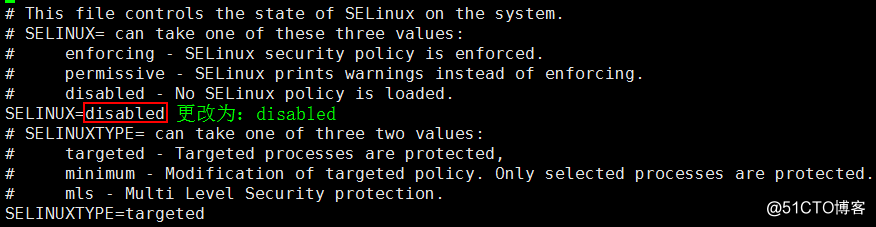
2. 永久关闭 selinux (防火墙),编辑... config 配置文件 :
(好多服务,受限于selinux,关闭selinux也不会有太大的安全问题)
[root@hao-001 ~]# vi /etc/selinux/ config
更改:SELINUX= disabled

firewalld (关闭centos7默认防火墙)
(firewalld默认是centos7的防火墙,可以关闭掉这个,用centos6上的防火墙 netfilter )
3. 禁止开机启动 firewalld 服务(centos7默认防火墙) :
[root@hao-001 ~]# systemctl disable firewalld

4. 关掉(停止) firewalld 服务(centos7默认防火墙) :
[root@hao-001 ~]# systemctl stop firewalld
netfilter (开启centos6默认防火墙)
5. 安装 netfilter 服务(centos6或centos5默认防火墙) :
注意:( iptables 是 netfiltel 防火墙 的工具)
[root@hao-001 ~]# yum install -y iptables-services
6. 启用 iptables 服务 :
[root@hao-001 ~]# systemctl enable iptables
7. 开启 iptables 服务 :
[root@hao-001 ~]# systemctl start iptables
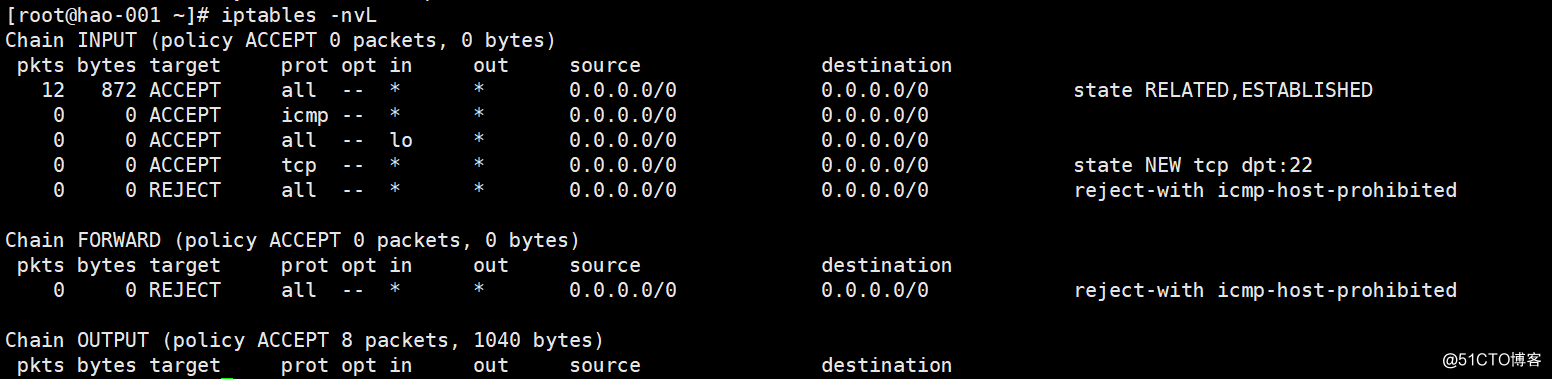
8. 查看 iptables 默认规则 :
[root@hao-001 ~]# iptables -nvL
10.13 netfilter5表5链介绍
Linux防火墙- netfilter
? netfilter 的5个表
? filter 表用于过滤包,最常用的表,有INPUT、FORWARD、OUTPUT三个链
? nat 表用于网络地址转换,有PREROUTING、OUTPUT、POSTROUTING三个链
? managle 表用于给数据包做标记,几乎用不到
? raw 表可以实现不追踪某些数据包,阿铭从来不用
? security 表在Centos6中并没有,用于强制访问控制(MAC)的 网络规则,阿铭老师没用过
? 参考文章 http://www.cnblogs.com/metoy/p/4320813.html
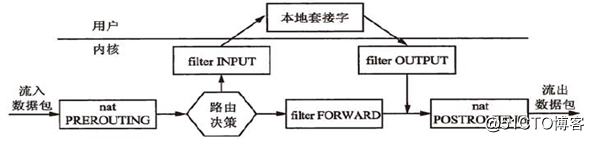
? 数据包流向与netfilter的5个链
? PREROUTING:数据包进入路由表之前
? INPUT:通过路由表后目的地为本机
? FORWARD:通过路由表后,目的地不为本机
? OUTPUT:由本机产生,向外发出
? POSTROUTING:发送到网卡接口之前

10.14 iptables语
1. 查看 iptables 默认规则 配置文件 :
[root@hao-001 ~]# cat /etc/sysconfig/ iptables
2. 查看 iptables 默认 规则:
[root@hao-001 ~]# iptables -nvL
3. 保存 iptables 规则(当前规则,保存到配置文件):
[root@hao-001 ~]# service iptables save
4. 清空 iptables 规则:
[root@hao-001 ~]# iptables -F
5. 重启 iptables 规则 :
[root@hao-001 ~]# service iptables restart
7. 指定表:
[root@hao-001 ~]# iptables -t nat -nvL
[root@hao-001 ~]# iptables -t filter -nvL
8. 把表的计数器清零:
[root@hao-001 ~]# iptables -nvL
-A 增加一条规则,添加在 最后
9. 增加 规则 , 增加 到 最后面 :
iptables -A (增加一条规则) INPUT (链) -s 来源ip -p tcp (协议) --sport 来源端口 -d 目标ip --dport 目标端口 -j DROP (扔掉)
[root@hao-001 ~]# iptables -A INPUT -s 192.168.223.1 -p tcp --sport 1234 -d 192.168.223.128 --dport 80 -j DROP
[root@hao-001 ~]# iptables -nvL
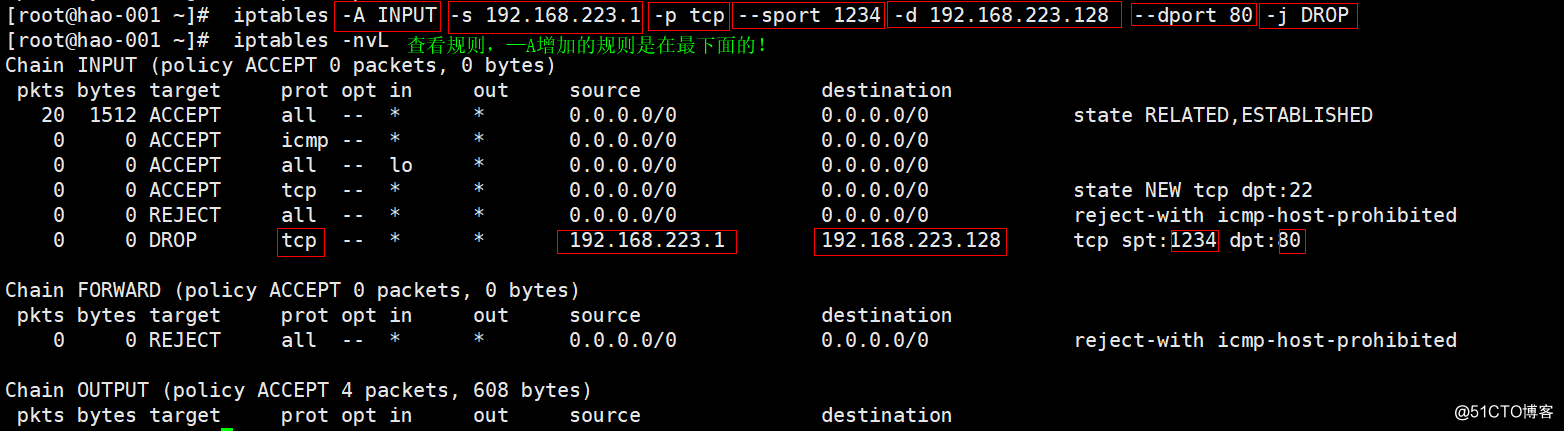
注意:不加 -t, 默认 filter 表
-A INPUT 增加 一条规则(添加到 最后 ) INPUT 链
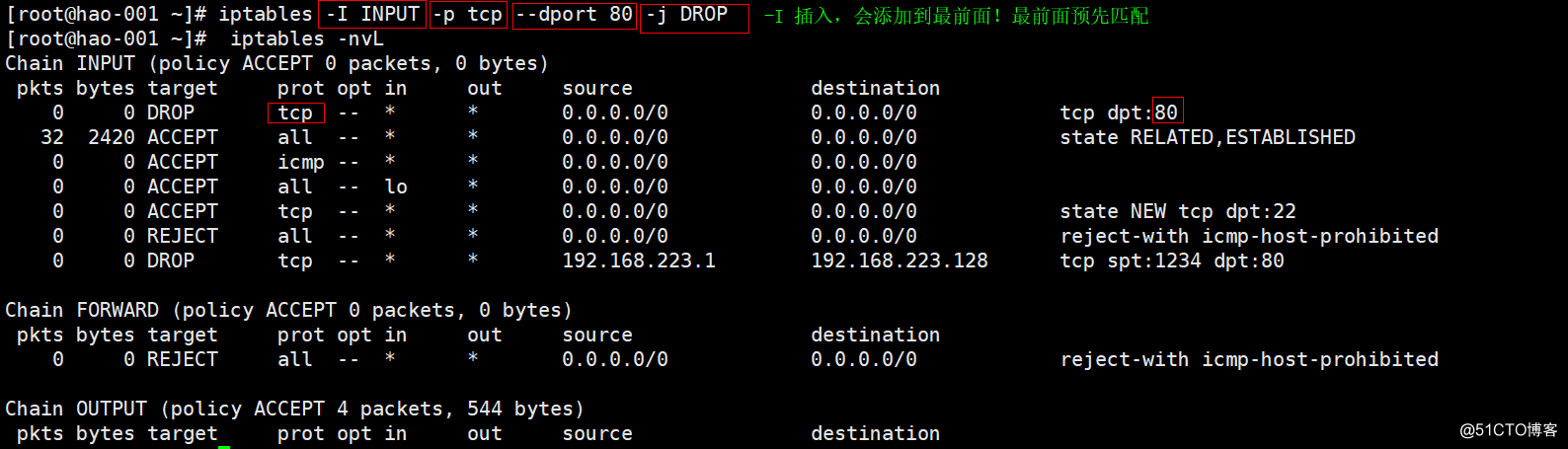
-I INPUT 插入 一条规则(添加到 最前 ) INPUT 链
-D INPUT 删除 一条规则 INPUT 链
-s 指定 来源ip
-p 指定协议为 tcp
--sport 指定 来源端口
-d 指定 目标ip
--dport 指定 目标端口
-i 指定 网卡
-j DROP 扔掉
10. 删掉 规则 :
iptables -D (删除一条规则) INPUT (链) -s 来源ip -p tcp (协议) --sport 来源端口 -d 目标ip --dport 目标端口 -j DROP (扔掉)
[root@hao-001 ~]# iptables -D INPUT -s 192.168.223.1 -p tcp --sport 1234 -d 192.168.223.128 --dport 80 -j DROP
-I 插入一条规则,添加在 最前
(排在最前的规则,优先过滤前面的,再过滤下面的规则)
11. 插入 规则 , 添加 在 最前面 :
iptables -I (插入一条规则) INPUT (链) -p tcp (协议) --dport 目标端口 -j DROP (扔掉)
[root@hao-001 ~]# iptables -I INPUT -p tcp --dport 80 -j DROP
[root@hao-001 ~]# iptables -nvL
12. 插入 规则 , 添加 在 最前面 , 并指定 网卡 :
-i 指定网卡
iptables -I (插入一条规则) INPUT (链) -s 来源IP / 24 -i 网卡名称 -j ACCEPT (扔掉)
[root@hao-001 ~]# iptables -I INPUT -s 192.168.1.0 / 24 -i eth0 -j ACCEPT
13. 删掉 设定的规则 (自己记得规则怎么写的,要不没法指定删除哦):
[root@hao-001 ~]# iptables -D INPUT -p tcp --dport 80 -j DROP
删除 规则 ?简单方便!!!
14. 打印出 规则 的 序列号编号:
[root@hao-001 ~]# iptables -nvL --line-number
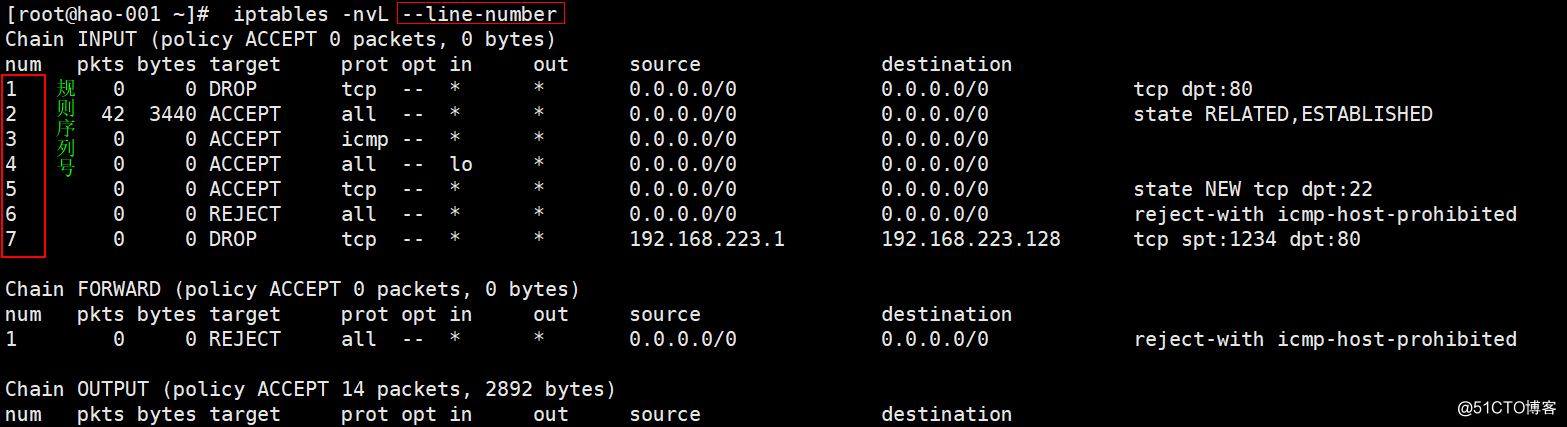
15. 删除指定规则: iptables -D INPUT 规则序列号编号
[root@hao-001 ~]# iptables -D INPUT 2
?更改默认规则(不常用 慎用 ): iptables -P INPUT DROP
?恢复默认规则: i ptables -P OUTPUT ACCEPT
原文:http://blog.51cto.com/zhuneianxiang/2064621
【说明】:本文章由站长整理发布,文章内容不代表本站观点,如文中有侵权行为,请与本站客服联系(QQ:254677821)!