任务计划相关程序:
在未来时间点一次性执行某任务:at, batch
周期性执行某任务: crontab \运维常用
执行结果查看:mail
mail 电子邮件服务:
默认执行结果写入 :/var/spool/mail/USERNAME
smtp: simple mail transmission protocol
/var/spool/mail/USERNAME
pop3: post office protocol
imap4: internet mail access protocol1`
MUA:mail命令
mail命令:
mail: 进入交互式收发邮件接口;
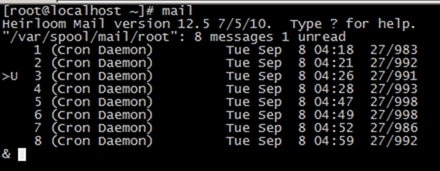 650) this.width=650;" title="clip_image001[6]" border="0" alt="clip_image001[6]" src="http://s3.51cto.com/wyfs02/M00/72/DE/wKiom1Xu1cvBZPlIAAEuQe4mUdE426.jpg" "444" height="175" />
 650) this.width=650;" title="clip_image002[4]" border="0" alt="clip_image002[4]" src="http://s3.51cto.com/wyfs02/M01/72/DE/wKiom1Xu1cvDY3NvAABGD2dS7AY587.jpg" "617" height="47" />
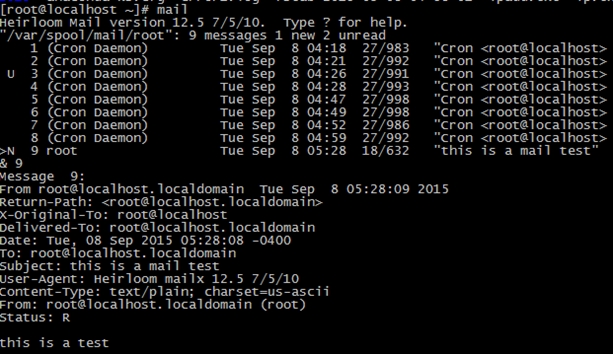 650) this.width=650;" title="clip_image003[4]" border="0" alt="clip_image003[4]" src="http://s3.51cto.com/wyfs02/M02/72/DE/wKiom1Xu1c3BEqIuAAL0LNSIGoY177.jpg" "617" height="358" />
mail -s ‘SUBJECT‘ username@hostname < /PATH/FROM/SOMEFILE
COMMAND | mail -s ‘SUBJECT‘ username@hostname
at:
承载未来时间运行的某作业:
支持使用作业队列:
默认为a队列;
Ctrl+d保存任务
at [option]... TIME
TIME:
(1) 绝对时间
HH:MM,
MMDD[CC]YY,MM/DD/[CC]YY, DD.MM.[CC]YY or [CC]YY-MM-DD
tomorrow
(2) 相对时间
now+#UNIT
minute,hour, day, week
(3) 模糊时间
Midnight 午夜
Noon下午
Teatime 下午茶时间
常用选项:
-q QUEUE: at作业队列;
-f/PATH/FROM/SOMEFILE:从指定的文件中读取要运行的作业;
-l: 查看作业队列中的等运行作业列表;相当于使用atq命令;
-c AT_JOB_NUM: 查看待运行作业的内容;
-d: 删除指定作业;相当于atrm
batch:
由系统自行选择在资源较为空闲时运行指定的任务;
crontab :周期性任务计划
守护进程:crond
周期性任务有两类:
(1) 系统cron任务;没有默认运行用户身份,所以需要额外指定运行者;
/etc/crontab
vim命令
#Example of job definition:
#.---------------- minute (0 - 59)
#| .------------- hour (0 - 23)
#| | .---------- day of month (1 - 31)
#| | | .------- month (1 - 12) ORjan,feb,mar,apr ...
#| | | | .---- day of week (0 - 6) (Sunday=0 or 7) ORsun,mon,tue,wed,thu,fri,sat
#| | | | |
#* * * * * user-name command to be executed
7个字段:
前5个字段:时间点
user-name:以user-name运行
commandto be executed: 要运行任务
(2) 用户cron任务:由某个用户所提交,默认就以提交者的身份运行,所以无需额外指定运行者;
/var/spool/cron/USERNAME
vim命令;不建议
crontab命令:建议
#Example of job definition:
#.---------------- minute (0 - 59)
#| .------------- hour (0 - 23)
#| | .---------- day of month (1 - 31)
#| | | .------- month (1 - 12) ORjan,feb,mar,apr ...
#| | | | .---- day of week (0 - 6) (Sunday=0 or 7) ORsun,mon,tue,wed,thu,fri,sat
#| | | | |
#* * * * * command to be executed
5个时间点:
分钟:有效取值范围0-59;
小时:0-23
日:1-31
月:1-12
周几:0-7
注意:几月几号与周几,不建议同时使用;
时间表示法:
*:对应时间点有效取值范围内的每个时间点;
-:一个特定连续时间范围, 3-7
,:一个离散的时间点, 3,5,7
/#:有效时间范围内的每多少时间;用于指定频率;
1-30/4,*/4
5*/3 * * * /bin/echo "howdy"
57 * * 1-5 /bin/echo "howdy"
crontab命令:
crontab[-u user] [-l | -r | -e]
-uuser: 不是管理自己的cron任务,而是指定的目标用户的cron任务;仅root拥有管理其它用户的cron任务的权限;默认管理自己的;
-l:list,列出任务;
-r: remove,移除所有任务;
-e:edit,编辑,打开一当前shell会话的默认编辑器来编辑cron任务表;
练习
每周一到周六的凌晨3点20分,运行cp命令对/etc/目录进行归档另存,存储位置为/backups/etc-YYYY-MM-DD
 650) this.width=650;" title="clip_image004[5]" border="0" alt="clip_image004[5]" src="http://s3.51cto.com/wyfs02/M02/72/DE/wKiom1Xu1c7Rv0xSAAA0y_cCNok221.jpg" "447" height="40" />
每周日凌晨2点30分,运行cp命令对/etc/fstab文件进行备份,存储位置为/backup/fstab-YYYY-MM-DD-hh-mm-ss
 650) this.width=650;" title="clip_image005[19]" border="0" alt="clip_image005[19]" src="http://s3.51cto.com/wyfs02/M00/72/DE/wKiom1Xu1c_xnHwgAAA7STrW24Q651.jpg" "557" height="28" />
每天晚上12点,取得/proc/meminfo文件中所有以S或M开头的行,追加至/statistics/meminfo.txt文件中,且每天的消息之前,要加上类似===============分隔线;
 650) this.width=650;" title="clip_image006[8]" border="0" alt="clip_image006[8]" src="http://s3.51cto.com/wyfs02/M02/72/DB/wKioL1Xu1_vTcqRnAAA4YJENjjY481.jpg" "617" height="21" />
原文:http://thinnercheng.blog.51cto.com/906539/1692878
【说明】:本文章由站长整理发布,文章内容不代表本站观点,如文中有侵权行为,请与本站客服联系(QQ:254677821)!