验证码倒计时按钮的应用是非常普遍的,该Blog就和你一起来写一个IDCountDownButton来实现验证码倒计时的效果。你可以想使用普通的UIButton类型按钮一样,只需要设置其倒计时时长(若未设置,默认为60秒),就可以轻松的实现点击countDownButton开始倒计时,倒计时结束方可重新点击。
一、实现效果
如图

二、实现思路
1、自定义一个IDCountDownButton,重写 beginTrackingWithTouch:withEvent: 拦截button的点击事件,根据是否正在倒计时决定是否响应并传递button的点击事件(若倒计时正在进行中,再次点击不会重新开始倒计时)
2、是用NSTimer定时器,定时改变IDCountDownButton的title
3、若倒计时结束,取消定时器并回复倒计时时长(使IDCountDownButton具备再次开始倒计时的能力)
4、在IDCountDownButton销毁时,同样取消定时器
三、实现步骤
1、添加相关的属性
公有属性(public)
|
1
2
3
4
|
@interface IDCountDownButton : UIButton
/** 验证码倒计时的时长 */
@property (nonatomic, assign) NSInteger durationOfCountDown;
@end
|
私有属性
|
1
2
3
4
5
6
7
8
|
@interface IDCountDownButton ()
/** 保存倒计时按钮的非倒计时状态的title */
@property (nonatomic, copy) NSString *originalTitle;
/** 保存倒计时的时长 */
@property (nonatomic, assign) NSInteger tempDurationOfCountDown;
/** 定时器对象 */
@property (nonatomic, strong) NSTimer *countDownTimer;
@end
|
2、重写setter
title属性的setter
1)、私有属性originalTitle用来暂存开始计时前button的标题,即用户设置的button的标题,通常是“获取验证码”
2)、需要屏蔽计时过程中,title更新时改变originalTitle的值
|
1
2
3
4
5
6
7
|
- (
void
)setTitle:(NSString *)title forState:(UIControlState)state {
[super setTitle:title forState:state];
// 倒计时过程中title的改变不更新originalTitle
if
(self.tempDurationOfCountDown == self.durationOfCountDown) {
self.originalTitle = title;
}
}
|
durationOfCountDown属性的setter
1)、设置tempDurationOfCountDown的值
2)、tempDurationOfCountDown的作用:倒计时;与durationOfCountDown配合判断当前IDCountDownButton是否具备重新开始倒计时的能力
|
1
2
3
4
|
- (
void
)setDurationOfCountDown:(NSInteger)durationOfCountDown {
_durationOfCountDown = durationOfCountDown;
self.tempDurationOfCountDown = _durationOfCountDown;
}
|
初始化
1)、设置倒计时的默认时长为60妙
2)、设置IDCountDownButton默认的title为“获取验证码”
|
1
2
3
4
5
6
7
8
9
10
11
12
13
14
15
16
17
18
|
- (instancetype)initWithFrame:(CGRect)frame {
if
(self = [super initWithFrame:frame]) {
// 设置默认的倒计时时长为60秒
self.durationOfCountDown = 60;
// 设置button的默认标题为“获取验证码”
[self setTitle:@
"获取验证码"
forState:UIControlStateNormal];
}
return
self;
}
- (instancetype)initWithCoder:(NSCoder *)aDecoder {
if
(self = [super initWithCoder:aDecoder]) {
// 设置默认的倒计时时长为60秒
self.durationOfCountDown = 60;
// 设置button的默认标题为“获取验证码”
[self setTitle:@
"获取验证码"
forState:UIControlStateNormal];
}
return
self;
}
|
拦截IDCountDownButton的点击事件,判断是否开始倒计时
1)、若tempDurationOfCountDown等于durationOfCountDown,说明未开始倒计时,响应并传递IDCountDownButton的点击事件;否则,不响应且不传递。
|
1
2
3
4
5
6
7
8
9
|
- (
BOOL
)beginTrackingWithTouch:(UITouch *)touch withEvent:(UIEvent *)event {
// 若正在倒计时,不响应点击事件
if
(self.tempDurationOfCountDown != self.durationOfCountDown) {
return
NO;
}
// 若未开始倒计时,响应并传递点击事件,开始倒计时
[self startCountDown];
return
[super beginTrackingWithTouch:touch withEvent:event];
}
|
倒计时
1)、创建定时器,开始倒计时
|
1
2
3
4
5
6
|
- (
void
)startCountDown {
// 创建定时器
self.countDownTimer = [NSTimer timerWithTimeInterval:1 target:self selector:@selector(updateIDCountDownButtonTitle) userInfo:nil repeats:YES];
// 将定时器添加到当前的RunLoop中(自动开启定时器)
[[NSRunLoop currentRunLoop] addTimer:self.countDownTimer forMode:NSRunLoopCommonModes];
}
|
2)、更新IDCountDownButton的title为倒计时剩余的时间
|
1
2
3
4
5
6
7
8
9
10
11
12
|
- (
void
)updateIDCountDownButtonTitle {
if
(self.tempDurationOfCountDown == 0) {
// 设置IDCountDownButton的title为开始倒计时前的title
[self setTitle:self.originalTitle forState:UIControlStateNormal];
// 恢复IDCountDownButton开始倒计时的能力
self.tempDurationOfCountDown = self.durationOfCountDown;
[self.countDownTimer invalidate];
}
else
{
// 设置IDCountDownButton的title为当前倒计时剩余的时间
[self setTitle:[NSString stringWithFormat:@
"%zd秒"
, self.tempDurationOfCountDown--] forState:UIControlStateNormal];
}
}
|
3)、移除定时器
|
1
2
3
|
- (
void
)dealloc {
[self.countDownTimer invalidate];
}
|
使用示例
1)、添加vertificationCodeIDCountDownButton属性
|
1
2
3
4
|
@interface ViewController ()
/** 验证码倒计时的button */
@property (nonatomic, strong) IDCountDownButton *vertificationCodeIDCountDownButton;
@end
|
2)、创建vertificationCodeIDCountDownButton并进行相关设置
|
1
2
3
4
5
6
7
8
9
10
11
12
13
14
15
16
|
- (
void
)viewDidLoad {
[super viewDidLoad];
// 创建vertificationCodeIDCountDownButton
self.vertificationCodeIDCountDownButton = [[IDCountDownButton alloc] initWithFrame:CGRectMake(160, 204, 120, 44)];
// 添加点击事件
[self.vertificationCodeIDCountDownButton addTarget:self action:@selector(vertificationCodeIDCountDownButtonClick:) forControlEvents:UIControlEventTouchUpInside];
// 设置标题相关属性
[self.vertificationCodeIDCountDownButton setTitleColor:[UIColor whiteColor] forState:UIControlStateNormal];
[self.vertificationCodeIDCountDownButton setTitle:@
"获取验证码"
forState:UIControlStateNormal];
// 设置背景图片
[self.vertificationCodeIDCountDownButton setBackgroundImage:[UIImage imageNamed:@
"redButton"
] forState:UIControlStateNormal];
// 设置倒计时时长
self.vertificationCodeIDCountDownButton.durationOfCountDown = 10;
// 将vertificationCodeIDCountDownButton添加的控制器的view中
[self.view addSubview:self.vertificationCodeIDCountDownButton];
}
|
3)、实现点击事件触发的操作
|
1
2
3
|
- (
void
)vertificationCodeIDCountDownButtonClick:(UIButton *)button {
// TODO:调用服务器接口,获取验证码
}
|
四、关于AppIcon
添加AppIcon时需要遵循以下规则
1)、命名,以Icon开头(首字母大写),跟上@2x/@3x,如图:

2)、尺寸,必须按要求设置尺寸,如图
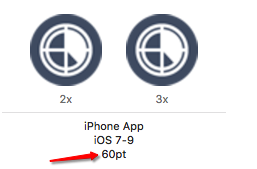
3)、图中所示的60pt对应的图片尺寸是
2x:120px X 120px
3x:180px X 180px
以上就是本文的全部内容,希望对大家的学习有所帮助。
原文:http://www.cnblogs.com/AnnieBabygn/p/5462153.html
【说明】:本文章由站长整理发布,文章内容不代表本站观点,如文中有侵权行为,请与本站客服联系(QQ:254677821)!