正常访问nginx的话是显示nginx欢迎页,也就是/nginx/html/index.html文件;
如果要显示/html/目录下所有的文件,需要打开目录文件列表显示;
在nginx.conf主配置文件中http或location代码段中,配置一段代码即可实现;
举例如下(绿色代码):
http {
include mime.types;
default_type application/octet-stream;
autoindex on;
autoindex_exact_size off;
autoindex_localtime on;
autoindex on; 自动显示目录
autoindex_exact_size off;
默认为on,显示出文件的确切大小,单位是bytes。
改为off后,显示出文件的大概大小,单位是kB或者MB或者GB
autoindex_localtime on;
默认为off,显示的文件时间为GMT时间。
改为on后,显示的文件时间为文件的服务器时间
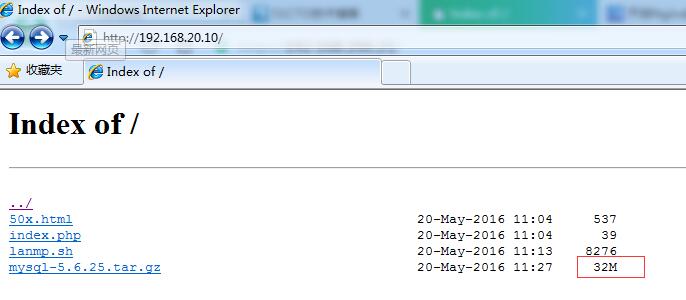
autoindex_exact_size on; 打开显示文件的实际大小,单位是bytes;
650) this.width=650;" src="/upload/getfiles/default/2022/11/9/20221109042859600.jpg" />

autoindex_exact_size off; 关闭后显示文件的大概大小,单位为KB或者MB或者GB,如下图
650) this.width=650;" src="/upload/getfiles/default/2022/11/9/20221109042859600.jpg" />
本文出自 “模范生的学习博客” 博客,请务必保留此出处http://mofansheng.blog.51cto.com/8792265/1775350
原文:http://mofansheng.blog.51cto.com/8792265/1775350
【说明】:本文章由站长整理发布,文章内容不代表本站观点,如文中有侵权行为,请与本站客服联系(QQ:254677821)!