这篇文章主要介绍了微信小程序 718137ecd0896f921b876dfd20260138标签传入数据的相关资料,需要的朋友可以参考下
微信小程序 718137ecd0896f921b876dfd20260138标签传入数据
在718137ecd0896f921b876dfd20260138中用for循环传入多个成对不同数据时的实现方法。
看下效果图:
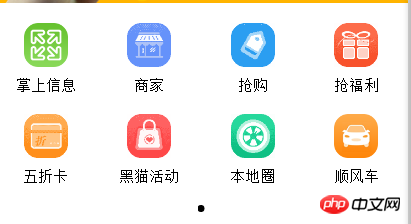
遍历实现方法:wxss省略:
wxml中代码:
<!--导航部分轮播图-->
<swiper class="navban" indicator-dots="{{indicatorDots}}" interval="{{interval}}" duration="{{duration}}">
    <swiper-item>
      <block wx:for="{{navs}}">
        <view class="navbox">
          <image class="navimg" src="{{item.navimg}}"></image>
          <text class="navtext">{{item.navtext}}</text>
        </view>
       </block>
    </swiper-item>
</swiper>
登录后复制
相对应js里面的代码:
var app = getApp()
Page({
 data: {
  navs:[
   { navimg:'/images/i01.png', navtext:'掌上信息'},
   { navimg:'/images/i02.png', navtext:'商家'},
   { navimg:'/images/i03.png', navtext:'抢购'},
   { navimg:'/images/i04.png', navtext:'抢福利'},
   { navimg:'/images/i05.png', navtext:'五折卡'},
   { navimg:'/images/i06.png', navtext:'黑猫活动'},
   { navimg:'/images/i07.png', navtext:'本地圈'},
   { navimg:'/images/i08.png', navtext:'顺风车'},
  ],
  indicatorDots: true,
  autoplay: true,
  interval: 2000,
  duration: 1000,
 }

})
登录后复制
以上就是本文的全部内容,希望对大家的学习有所帮助,更多相关内容请关注PHP中文网!
相关推荐:
【说明】:本文章由站长整理发布,文章内容不代表本站观点,如文中有侵权行为,请与本站客服联系(QQ:254677821)!